Make error

Discussion about everything. New games, 3d math, development tips...
JP
Posts: 4526
Joined: Tue Sep 13, 2005 2:56 pm
Location: UK
Contact:

Make error

Post by JP »

Ok, this is fairly off topic as it has nothing to do with irrlicht but it does have relevance to game programming. What i'm trying to do is homebrew Nintendo DS programming but my problem isn't relevant to just that so i thought i'd ask here.

Basically i've got all the development libraries and i want to build some of the examples to try them out but they won't build. I'm on Windows so i'm using MinGW MSYS (tried Cygwin too) to run the makefiles but i get the following error:

$make
make: make: Command not found
make: *** [build] error 127

So i googled 'make: command not found' and what i found suggested that the make program was not installed but it should be as i can use make when working with PS3 games.

So does anyone have any ideas? I've tried it on both my home and work PCs and have the same problems :(

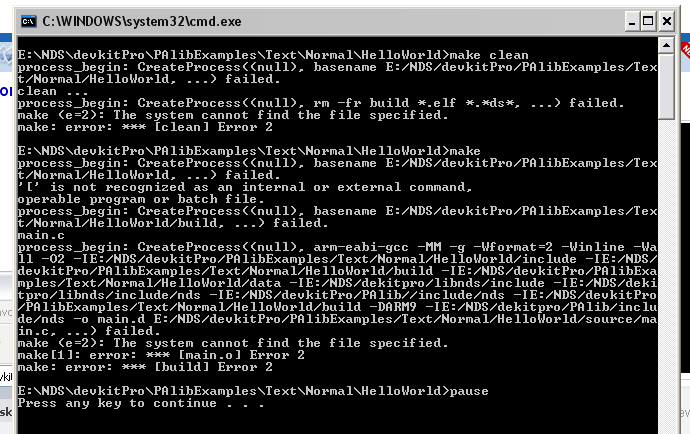
Incidentally if i use the build.bat provided with some of the examples then i get this error:
Image
Image Image Image
hybrid
Admin
Posts: 14143
Joined: Wed Apr 19, 2006 9:20 pm
Location: Oldenburg(Oldb), Germany
Contact:

Post by hybrid »

I think that some tools used in the makefile are not found. At least your examples asks for '[' which is a shell test app ( [ -f tmp ] means 'if tmp is a file') So I guess your build environment is not complete for arbitrary makefiles.
JP
Posts: 4526
Joined: Tue Sep 13, 2005 2:56 pm
Location: UK
Contact:

Post by JP »

Oky dokey, i'll have to see if i can install these extra bits!
Image Image Image
Saturn
Posts: 418
Joined: Mon Sep 25, 2006 5:58 pm

Post by Saturn »

Maybe you did not add your devkitpro/devkitARM/bin and devkitpro/msys/bin directories to your PATH? You shouldn't need another msys installation, in fact I'd discourage it, the devkitpro distribution is self-containing.

I use devkitpro together with Visual C++ Express,as it is a bit more comfortable. See http://www.devkitpro.org/visual-c++-express.shtml
Though I use libnds and not PALib. But you still need to do the basic devkitpro-setup.
JP
Posts: 4526
Joined: Tue Sep 13, 2005 2:56 pm
Location: UK
Contact:

Post by JP »

Well across on the PAlib forums i did some searching and it seems it could be due to msys not being in the PATH env var but unfortunately on my work PC i don't have access to that var (damned lack of admin rights :evil: ). I can always try this at home though on my PC.

The only env vars i've set at DEVKITPROand DEVKITARM do i need to add devkitARM/bin to the PATH var as well? I'd not seen anything telling me to do that. That could put a spanner in the works for slyly doing this stuff at work as i'd have to get tech support to add those in for me :lol: (unless i can do it via user vars instead of env vars).
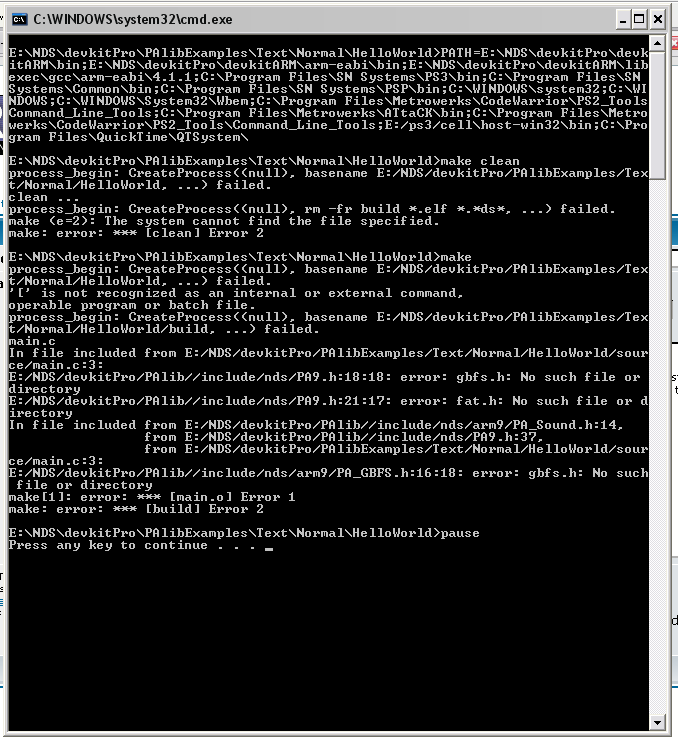
Image Image Image
Saturn
Posts: 418
Joined: Mon Sep 25, 2006 5:58 pm

Post by Saturn »

I just checked, I have only devkitpro/msys/bin in my path, not devkitARM/bin, but I am quite sure the installer did this, but if it doesn't have the rights, it probably is ommitted.

Anyway, you can do this on the command line yourself and then try to build the samples.
omaremad
Competition winner
Posts: 1027
Joined: Fri Jul 15, 2005 11:30 pm
Location: Cairo,Egypt

Post by omaremad »

You can edit the make files so the dirs to the bin directory are right thats how i got devkit pro to work on vista by defining path in the make file, also take care with palib it can reduce constrict you when it comes to doing advanced stuff like 3D latter on (vram bank management is better left explicit). However for quick / 2d projects its very good.
"Irrlicht is obese"

If you want modern rendering techniques learn how to make them or go to the engine next door =p
JP
Posts: 4526
Joined: Tue Sep 13, 2005 2:56 pm
Location: UK
Contact:

Post by JP »

I've tried editing the makefiles but my knowledge of them is a bit sparse so i may have done it wrong... in fact i probably did do it wrong as it still didn't work...

What i did was replace make with the path to make like so:

From:
$(BUILD):
@[ -d $@ ] || mkdir -p $@
@make --no-print-directory -C $(BUILD) -f $(CURDIR)/Makefile

To:
$(BUILD):
@[ -d $@ ] || mkdir -p $@
@E:/NDS/devkitpro/msys/bin/make.exe --no-print-directory -C $(BUILD) -f $(CURDIR)/Makefile

(also tried leaving out the exe but that didn't work either)

That comes up with the errors below:

make[1]: basename: Command not found
make[1]: echo: Command not found
Image Image Image
hybrid
Admin
Posts: 14143
Joined: Wed Apr 19, 2006 9:20 pm
Location: Oldenburg(Oldb), Germany
Contact:

Post by hybrid »

Which shows that you don't have make in your PATH. Take the first version and add the msys/bin path to your PATH.
JP
Posts: 4526
Joined: Tue Sep 13, 2005 2:56 pm
Location: UK
Contact:

Post by JP »

Near the start of the makefile i have this:

PATH := $(DEVKITARM)/bin:$(PATH)

Presumably i can stick it in there? Not sure how to do that though, i've tried various alterations of the following

PATH := $(DEVKITARM)/bin;E:/NDS/devkitpro/msys/bin:$(PATH)
Image Image Image
omaremad
Competition winner
Posts: 1027
Joined: Fri Jul 15, 2005 11:30 pm
Location: Cairo,Egypt

Post by omaremad »

Ok i looked back at my old windows partition and i found i had this in the build batch file before make

PATH=C:\devkitPro\devkitARM\bin;C:\devkitPro\devkitARM\arm-eabi\bin;C:\devkitPro\devkitARM\libexec\gcc\arm-eabi\4.1.1;%PATH%

The path is only set during the lifetime of cmd window that appears.
"Irrlicht is obese"

If you want modern rendering techniques learn how to make them or go to the engine next door =p
JP
Posts: 4526
Joined: Tue Sep 13, 2005 2:56 pm
Location: UK
Contact:

Post by JP »

Woohoo! Progress!

(incidentally i think my previous post was the most stupid thing anyone's ever posted as i imagine it's a bit late to specify the path to make inside a makefile :lol: )

Here's the output now:
Image

So it seems it can't find clean.exe which seems fair as that's not actually in the msys/bin folder, for some reason, but that's good, it's not meant to be able to find it and i should be able to resolve that fairly easily i hope.

But the output shows that at least we're getting to actual compiling as it's complaining it can't find header files, hopefully that shouldn't be too hard to sort out though i would imagine it should work out the box, but life's not always that easy!

CreateProcess failing doesn't sound too good though, i've seen that problem before elsewhere and it was due to tools not being located so i wonder what's wrong there...

Anyway it's home time now and i'm off to the gym so i shall return on the morrow and hopefully things will fall into place!

Cheers for all the help so far, sorry for being a bore!
Image Image Image
omaremad
Competition winner
Posts: 1027
Joined: Fri Jul 15, 2005 11:30 pm
Location: Cairo,Egypt

Post by omaremad »

gbfs is now out of date, use fat lib or for small files use arrays in .h files.

edit: palib is using its own includes it seems?
"Irrlicht is obese"

If you want modern rendering techniques learn how to make them or go to the engine next door =p
omaremad
Competition winner
Posts: 1027
Joined: Fri Jul 15, 2005 11:30 pm
Location: Cairo,Egypt

Post by omaremad »

makefile provided seems confused, it thinks the library base dir is only the palib one. Those files are under the ndslib folder. Paste the make file please.
"Irrlicht is obese"

If you want modern rendering techniques learn how to make them or go to the engine next door =p
hybrid
Admin
Posts: 14143
Joined: Wed Apr 19, 2006 9:20 pm
Location: Oldenburg(Oldb), Germany
Contact:

Post by hybrid »

There is no clean.exe, clean is a make target. It calls rm (which is equivalent to dos-command del), but rm is not found. And the mentioned test shell command is also not existant.
Post Reply