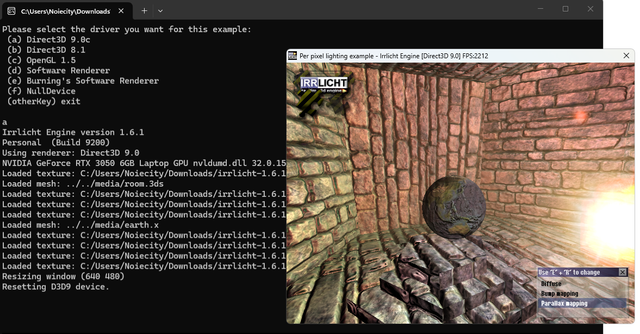
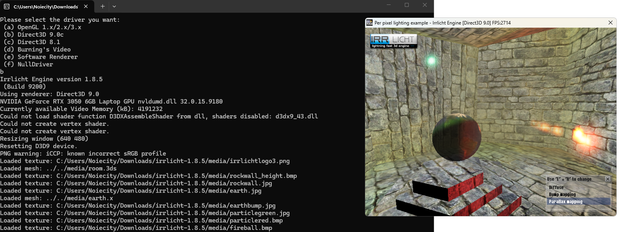
First, I enabled the flags to compile with C++98, and changed two `nullptr`s that were somewhere in the OpenGL code – I can’t remember where – to `NULL`.
I then successfully compiled the code (I hadn’t checked the console yet).
I tried moving the executable file to another location, and it appeared not to run because some of the C++ wasn’t statically linked… so I compiled Irrlicht source statically(Win32 - Release - fast math - static); now I could move the executable file and it worked…
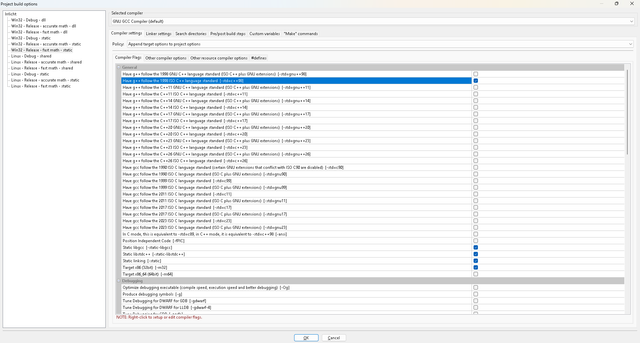
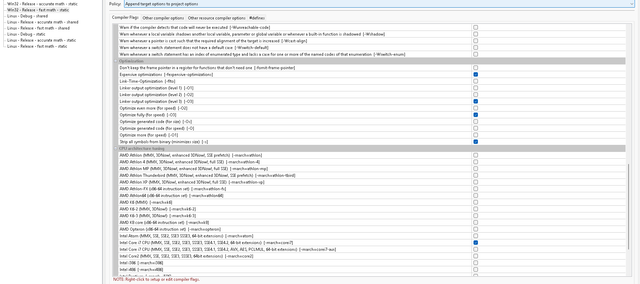
(I think you only need d3d9 and d3dx9 to compile correctly; I’ve managed to compile it using d3d9, d3dx9 and dxguid – I haven’t tried it without dxguid)
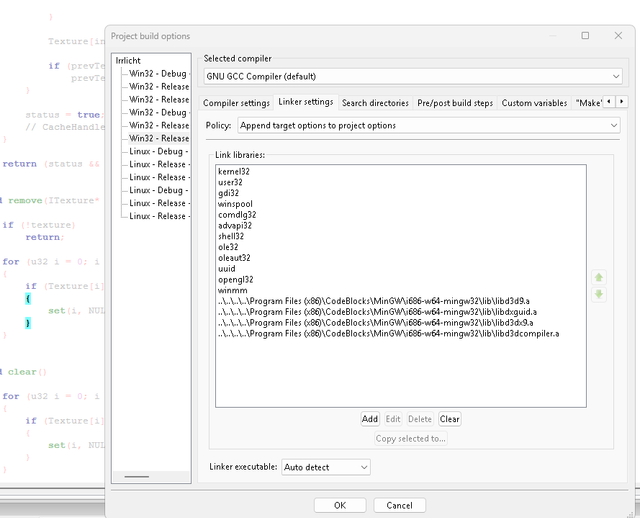
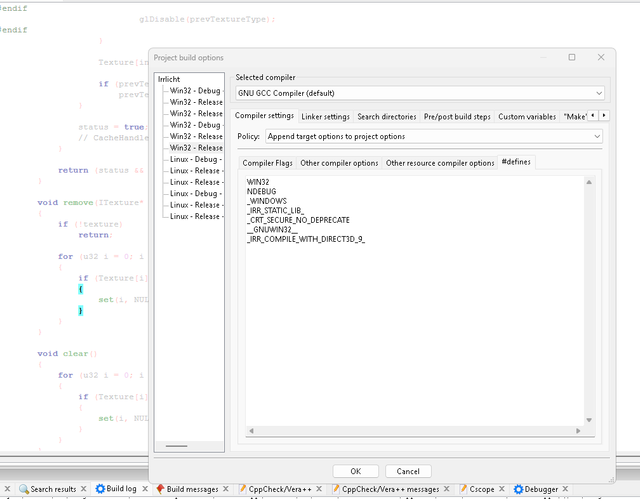
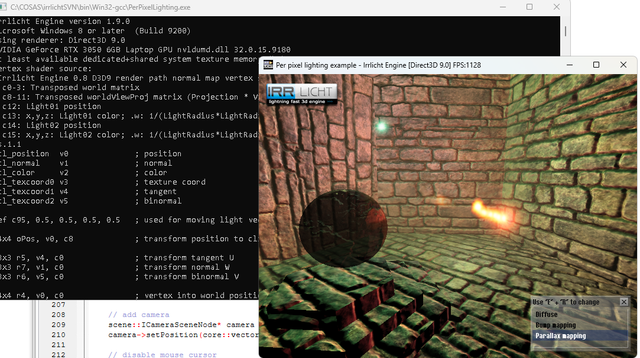
but to my surprise, I got this:
Irrlicht Engine version 1.9.0
Microsoft Windows 8 or later (Build 9200)
Using renderer: Direct3D 9.0
NVIDIA GeForce RTX 3050 6GB Laptop GPU nvldumd.dll 32.0.15.9180
At least available dedicated+shared system texture memory (kB): 4177920
Could not load shader function D3DXAssembleShader from dll, shaders disabled: d3dx9_43.dll
Could not create vertex shader.
Could not create vertex shader.
Resizing window (1920 1061)
Resetting D3D9 device.
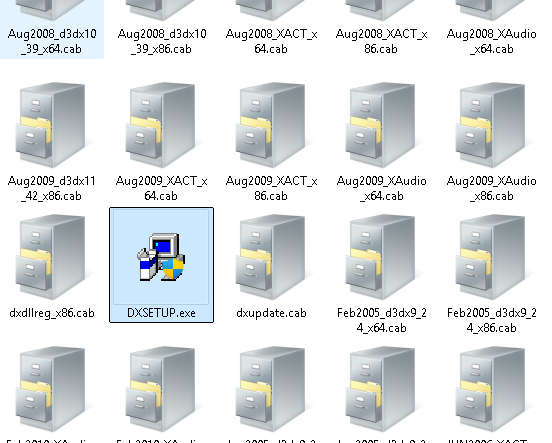
I managed to sort out the .dll issue by downloading the file in question, but I couldn’t fix the vertex shader compilation errors. I want to compile using GCC as its auto-vectorisation is among the best available in C++; Visual Studio with MSBUILD doesn’t have such robust auto-vectorisation.
(I also vectorised it, optimising it for CPUs from 2013 to maximise compatibility(-march=corei7))
And don’t even get me started on trying to vectorise SIMD instructions manually yourself – GCC always does it better (I’ve tried to do it better, and I couldn’t, and others have tried too https://markaicode.com/gcc-14-auto-vect ... -assembly/:
Code: Select all
#ifdef _MSC_VER
#pragma comment(lib, "Irrlicht.lib")
#pragma comment(linker, "/subsystem:windows /ENTRY:mainCRTStartup")
#endif

#include <irrlicht.h>

using namespace irr;
using namespace core;
using namespace scene;
using namespace video;
using namespace io;
using namespace gui;


// -----------------------------------------------------------------------------
// Single controller that maintains the base position + orientation and derives
// both cameras of the horizontal stereo pair.
//
// Mouse behaviour:
//   * The OS cursor is hidden.
//   * Deltas are computed against the last known cursor position, so the
//     camera rotates smoothly without forcing the cursor to the center.
//   * The cursor is only teleported back to the center when it gets close to
//     a screen edge. This keeps 360-degree rotation possible while avoiding
//     the "cursor fights to return to center" feeling.
// -----------------------------------------------------------------------------
class TwoViewportController : public IEventReceiver
{
public:

    TwoViewportController(ICameraSceneNode* left,
                          ICameraSceneNode* right,
                          const vector3df& startPos,
                          const vector3df& startTarget,
                          ICursorControl* cursorControl,
                          s32 centerX,
                          s32 centerY,
                          s32 screenW,
                          s32 screenH,
                          f32 moveSpeed        = 30.0f,
                          f32 mouseSensitivity = 0.15f,
                          s32 edgeMargin       = 100)
        : CamLeft(left),
          CamRight(right),
          Position(startPos),
          MoveSpeed(moveSpeed),
          MouseSensitivity(mouseSensitivity),
          CursorControl(cursorControl),
          CenterX(centerX),
          CenterY(centerY),
          ScreenW(screenW),
          ScreenH(screenH),
          EdgeMargin(edgeMargin),
          LastMouseX(-1),
          LastMouseY(-1)
    {
        vector3df dir = (startTarget - startPos).normalize();

        Yaw   = atan2f(dir.X, dir.Z);
        Pitch = asinf(core::clamp(dir.Y, -1.0f, 1.0f));

        for (u32 i = 0; i < KEY_KEY_CODES_COUNT; ++i)
            KeyIsDown[i] = false;

        updateCameras();
    }


    bool OnEvent(const SEvent& event) override
    {
        if (event.EventType == EET_KEY_INPUT_EVENT)
        {
            KeyIsDown[event.KeyInput.Key] =
                event.KeyInput.PressedDown;

            return false;
        }


        if (event.EventType == EET_MOUSE_INPUT_EVENT &&
            event.MouseInput.Event == EMIE_MOUSE_MOVED)
        {
            const s32 x = event.MouseInput.X;
            const s32 y = event.MouseInput.Y;

            // First mouse event after the cursor was (re)placed: just record
            // the position, don't treat it as a movement.
            if (LastMouseX < 0)
            {
                LastMouseX = x;
                LastMouseY = y;
                return true;
            }

            const s32 dx = x - LastMouseX;
            const s32 dy = y - LastMouseY;

            LastMouseX = x;
            LastMouseY = y;

            if (dx != 0 || dy != 0)
            {
                Yaw   += (f32)dx * MouseSensitivity * core::DEGTORAD;
                Pitch -= (f32)dy * MouseSensitivity * core::DEGTORAD;

                const f32 limit = 89.0f * core::DEGTORAD;
                if (Pitch >  limit) Pitch =  limit;
                if (Pitch < -limit) Pitch = -limit;
            }

            // Only teleport the cursor back to the center when it is close to
            // an edge. This lets the cursor move freely in the middle of the
            // screen while still allowing unlimited rotation.
            if (CursorControl &&
                (x <  EdgeMargin          ||
                 x >  ScreenW - EdgeMargin ||
                 y <  EdgeMargin          ||
                 y >  ScreenH - EdgeMargin))
            {
                // Set LastMouse *before* setPosition so that the synthetic
                // event generated by the recenter produces a zero delta.
                LastMouseX = CenterX;
                LastMouseY = CenterY;

                CursorControl->setPosition(CenterX, CenterY);
            }

            return true;
        }

        return false;
    }


    void update(f32 dt)
    {
        vector3df fwd = getBaseDirection();

        fwd.Y = 0;

        if (fwd.getLength() < 1e-4f)
            fwd = vector3df(0, 0, 1);
        else
            fwd.normalize();


        const vector3df right =
            fwd.crossProduct(vector3df(0, 1, 0)).normalize();


        vector3df move(0, 0, 0);

        if (KeyIsDown[KEY_KEY_W]) move += fwd;
        if (KeyIsDown[KEY_KEY_S]) move -= fwd;
        if (KeyIsDown[KEY_KEY_D]) move -= right;
        if (KeyIsDown[KEY_KEY_A]) move += right;

        if (move.getLength() > 1e-4f)
        {
            move.normalize();

            Position += move * MoveSpeed * dt;
        }

        updateCameras();
    }


private:

    vector3df getBaseDirection() const
    {
        vector3df d;

        d.X = cosf(Pitch) * sinf(Yaw);
        d.Y = sinf(Pitch);
        d.Z = cosf(Pitch) * cosf(Yaw);

        return d;
    }


    static matrix4 makePerspectiveOffCenterLH(
        f32 l, f32 r,
        f32 b, f32 t,
        f32 n, f32 f)
    {
        matrix4 m;
        m.makeIdentity();

        m(0,0) =  2.0f * n / (r - l);
        m(0,1) =  0.0f;
        m(0,2) =  0.0f;
        m(0,3) =  0.0f;

        m(1,0) =  0.0f;
        m(1,1) =  2.0f * n / (t - b);
        m(1,2) =  0.0f;
        m(1,3) =  0.0f;

        m(2,0) = (l + r) / (l - r);
        m(2,1) = (t + b) / (b - t);
        m(2,2) =  f / (f - n);
        m(2,3) =  1.0f;

        m(3,0) =  0.0f;
        m(3,1) =  0.0f;
        m(3,2) = -n * f / (f - n);
        m(3,3) =  0.0f;

        return m;
    }


    void updateCameras()
    {
        const vector3df baseDir = getBaseDirection();

        vector3df up(0, 1, 0);
        up -= baseDir * up.dotProduct(baseDir);
        up.normalize();

        CamLeft->setPosition(Position);
        CamLeft->setTarget(Position + baseDir);
        CamLeft->setUpVector(up);

        CamRight->setPosition(Position);
        CamRight->setTarget(Position + baseDir);
        CamRight->setUpVector(up);

        const f32 n = CamLeft->getNearValue();
        const f32 f = CamLeft->getFarValue();

        const f32 halfVAngleRad = 26.565f * core::DEGTORAD;
        const f32 halfH         = n * tanf(halfVAngleRad);
        const f32 halfW         = 2.0f * halfH;

        const matrix4 projLeft =
            makePerspectiveOffCenterLH(
                -halfW,  0.0f,
                -halfH,  halfH,
                 n,      f);

        const matrix4 projRight =
            makePerspectiveOffCenterLH(
                 0.0f,   halfW,
                -halfH,  halfH,
                 n,      f);

        CamLeft ->setProjectionMatrix(projLeft,  false);
        CamRight->setProjectionMatrix(projRight, false);
    }


    ICameraSceneNode* CamLeft;
    ICameraSceneNode* CamRight;

    vector3df Position;

    f32 Yaw;
    f32 Pitch;

    f32 MoveSpeed;
    f32 MouseSensitivity;

    ICursorControl* CursorControl;
    s32 CenterX;
    s32 CenterY;
    s32 ScreenW;
    s32 ScreenH;
    s32 EdgeMargin;

    s32 LastMouseX;
    s32 LastMouseY;

    bool KeyIsDown[KEY_KEY_CODES_COUNT];
};


// -----------------------------------------------------------------------------
// Draw one screen-aligned textured quad.
// -----------------------------------------------------------------------------
static void drawScreenQuad(
    IVideoDriver* driver,
    ITexture* tex,
    f32 x0, f32 y0, f32 x1, f32 y1)
{
    const SColor white(255, 255, 255, 255);

    S3DVertex v[4];

    v[0] = S3DVertex(x0, y0, 0.f, 0.f, 0.f, 1.f, white, 0.f, 0.f);
    v[1] = S3DVertex(x1, y0, 0.f, 0.f, 0.f, 1.f, white, 1.f, 0.f);
    v[2] = S3DVertex(x1, y1, 0.f, 0.f, 0.f, 1.f, white, 1.f, 1.f);
    v[3] = S3DVertex(x0, y1, 0.f, 0.f, 0.f, 1.f, white, 0.f, 1.f);

    const u16 idx[6] = { 0, 1, 2,  0, 2, 3 };

    SMaterial drawMat;
    drawMat.Lighting         = false;
    drawMat.ZBuffer          = ECFN_DISABLED;
    drawMat.ZWriteEnable     = EZW_OFF;
    drawMat.MaterialType     = EMT_SOLID;
    drawMat.TextureLayer[0].Texture            = tex;
    drawMat.TextureLayer[0].BilinearFilter     = false;
    drawMat.TextureLayer[0].TrilinearFilter    = false;
    drawMat.TextureLayer[0].AnisotropicFilter  = 0;
    drawMat.TextureLayer[0].TextureWrapU       = ETC_CLAMP_TO_EDGE;
    drawMat.TextureLayer[0].TextureWrapV       = ETC_CLAMP_TO_EDGE;
    drawMat.TextureLayer[0].LODBias            = 0;

    driver->setMaterial(drawMat);

    driver->drawVertexPrimitiveList(
        v, 4,
        idx, 2,
        EVT_STANDARD,
        EPT_TRIANGLES);
}


// -----------------------------------------------------------------------------
// MAIN
// -----------------------------------------------------------------------------
int main()
{
    IrrlichtDevice* device =
        createDevice(
            video::EDT_DIRECT3D9,
            dimension2d<u32>(1920, 1080),
            32,
            false,
            false,
            false,
            0);

    if (!device)
        return 1;

    IVideoDriver*    driver = device->getVideoDriver();
    ISceneManager*   smgr   = device->getSceneManager();
    IGUIEnvironment* guienv = device->getGUIEnvironment();

    driver->setTextureCreationFlag(ETCF_CREATE_MIP_MAPS, false);

    IAnimatedMesh* mesh = smgr->getMesh("../../media/sydney.md2");

    if (!mesh)
    {
        device->drop();
        return 1;
    }

    IAnimatedMeshSceneNode* node = smgr->addAnimatedMeshSceneNode(mesh);

    if (node)
    {
        node->setMaterialFlag(EMF_LIGHTING, false);
        node->setMD2Animation(scene::EMAT_STAND);
        node->setMaterialFlag(EMF_BILINEAR_FILTER, false);
        node->setMaterialTexture(
            0,
            driver->getTexture("../../media/sydney.bmp"));
    }

    ICameraSceneNode* camLeft = smgr->addCameraSceneNode();
    camLeft->setNearValue(1.0f);
    camLeft->setFarValue(400.0f);

    ICameraSceneNode* camRight = smgr->addCameraSceneNode();
    camRight->setNearValue(1.0f);
    camRight->setFarValue(400.0f);

    const u32 RT_SIZE = 128 - 32;

    ITexture* rtLeft =
        driver->addRenderTargetTexture(
            dimension2d<u32>(RT_SIZE, RT_SIZE), "rtLeft");

    ITexture* rtRight =
        driver->addRenderTargetTexture(
            dimension2d<u32>(RT_SIZE, RT_SIZE), "rtRight");

    if (!rtLeft || !rtRight)
    {
        device->drop();
        return 1;
    }

    ICursorControl* cursorControl = device->getCursorControl();

    const s32 screenW = (s32)driver->getScreenSize().Width;
    const s32 screenH = (s32)driver->getScreenSize().Height;
    const s32 centerX = screenW / 2;
    const s32 centerY = screenH / 2;

    TwoViewportController controller(
        camLeft,
        camRight,
        vector3df(0, 20, -40),
        vector3df(0, 5, 0),
        cursorControl,
        centerX,
        centerY,
        screenW,
        screenH,
        30.0f,     // move speed
        0.15f,     // mouse sensitivity
        100);      // edge margin for recentering

    device->setEventReceiver(&controller);

    if (cursorControl)
    {
        cursorControl->setVisible(false);
        cursorControl->setPosition(centerX, centerY);
    }

    IGUIStaticText* fpsText =
        guienv->addStaticText(
            L"FPS: 0",
            rect<s32>(10, 10, 160, 30),
            false, false, 0, -1, true);

    fpsText->setOverrideColor(SColor(255, 255, 255, 0));
    fpsText->setBackgroundColor(SColor(160, 0, 0, 0));

    u32 lastTime = device->getTimer()->getTime();

    while (device->run())
    {
        const u32 now = device->getTimer()->getTime();
        const f32 dt  = (f32)(now - lastTime) / 1000.0f;
        lastTime = now;

        controller.update(dt);

        driver->beginScene(true, true, SColor(255, 0, 0, 0));

        driver->setRenderTarget(rtLeft, true, true, SColor(255, 0, 0, 0));
        smgr->setActiveCamera(camLeft);
        smgr->drawAll();

        driver->setRenderTarget(rtRight, true, true, SColor(255, 0, 0, 0));
        smgr->setActiveCamera(camRight);
        smgr->drawAll();

        driver->setRenderTarget(0, false, false);

        const dimension2d<u32> screenSize = driver->getScreenSize();
        const s32 W = (s32)screenSize.Width;
        const s32 H = (s32)screenSize.Height;

        driver->setViewPort(rect<s32>(0, 0, W, H));

        s32 totalW, totalH;

        if (W / 2 <= H) { totalW = W; totalH = W / 2; }
        else            { totalH = H; totalW = H * 2; }

        const s32 offsetX = (W - totalW) / 2;
        const s32 offsetY = (H - totalH) / 2;
        const s32 halfW   = totalW / 2;

        matrix4 ortho;
        ortho.makeIdentity();
        ortho[0]  =  2.0f / (f32)W;
        ortho[5]  = -2.0f / (f32)H;
        ortho[12] = -1.0f;
        ortho[13] =  1.0f;

        matrix4 identity;
        identity.makeIdentity();

        driver->setTransform(ETS_PROJECTION, ortho);
        driver->setTransform(ETS_VIEW,       identity);
        driver->setTransform(ETS_WORLD,      identity);

        drawScreenQuad(driver, rtLeft,
            (f32)offsetX, (f32)offsetY,
            (f32)(offsetX + halfW), (f32)(offsetY + totalH));

        drawScreenQuad(driver, rtRight,
            (f32)(offsetX + halfW), (f32)offsetY,
            (f32)(offsetX + totalW), (f32)(offsetY + totalH));

        core::stringw fpsStr = L"FPS: ";
        fpsStr += driver->getFPS();
        fpsText->setText(fpsStr.c_str());

        guienv->drawAll();

        driver->endScene();
    }

    device->drop();
    return 0;
}
thanks