The Dustbin Framework

Announce new projects or updates of Irrlicht Engine related tools, games, and applications.
Also check the Wiki
Post Reply
Brainsaw
Posts: 1270
Joined: Wed Jan 07, 2004 12:57 pm
Location: Bavaria

The Dustbin Framework

Post by Brainsaw »

Hello fellow Irrlicht users,

I have spent some time creating a framework, mainly for myself, and today I finished a project setup wizard which may help a lot. You can find it at https://sourceforge.net/p/dustbinframew ... ster/tree/

It comes with the following:
  • It uses "modules" which add functionality for applications. The modules cover e.g. 3d sound (using SFML), fonts (using freetype), a self-hacked localization system, some additional scene nodes (including the "unknown scene node" which can load any scene node - it won't display what's intended, but at least the data is not lost) and physics (using the "Open Dynamics Engine" at the moment)
  • It uses JSON files to define a project. There are two files included in the "Scripts/MakeCMakeWizard", "dustbingamesframework.json" tests the compilation of all modules and "dustbineditors" compile a GUI editor and two 3d editors, one with physics and one without
  • There is a main class which just runs commands (more on that later)
  • Inside the main class there is a "Data Hub" which gives access to all important object instances and creates the Irrlicht device. By default it uses OpenGL, but it's not complicated to create another data hub which uses some different settings, an instance of this new hub must then be added to the main class before the hub is called
  • When a new project is created some code is automatically added, one cpp file which contains the "main" function and can be modified and one cpp file which contains code to initialize modules (some of them need initialization, e.g. factory registration)
  • The functionality of the apps is encapsulated in "Command" classes. These commands may or may not handle Irrlicht events and can implement a function which is called for every frame
  • There is a command stack in the main class which can contain multiple commands, and they communicate using messages from auto-generated code (although this needs some rework). The idea is to split the application into commands depending on the functionality, e.g. the UI of a game is in another class than the work, and they don't know anything of each other but just send and receive messages. This way one can easily replace the UI depending e.g. on player choice
  • The framework itself comes with a GUI editor and two Scene editors, one with and one without physics. One of my ideas is to create two scene editors per game, one for the developers and one which can be published with limited funcationality, e.g. no option to modify the cars in a racing game
  • The whole thing is licensed under the terms of the ZLib license
I know that there is still a lot to do in order to get it really ready for production code, but I wanted to show it. I created this mainly for myself to get future projects started faster, but I want to give everyone an oportunity to also use it.

One set of "modules" I want to include soon is for the Steam libraries, Steam Input seems interesting, and I just entered the waiting list for the Steam Frame, so I want to add a module for VR as well (and Google AI says it's not too complicated)

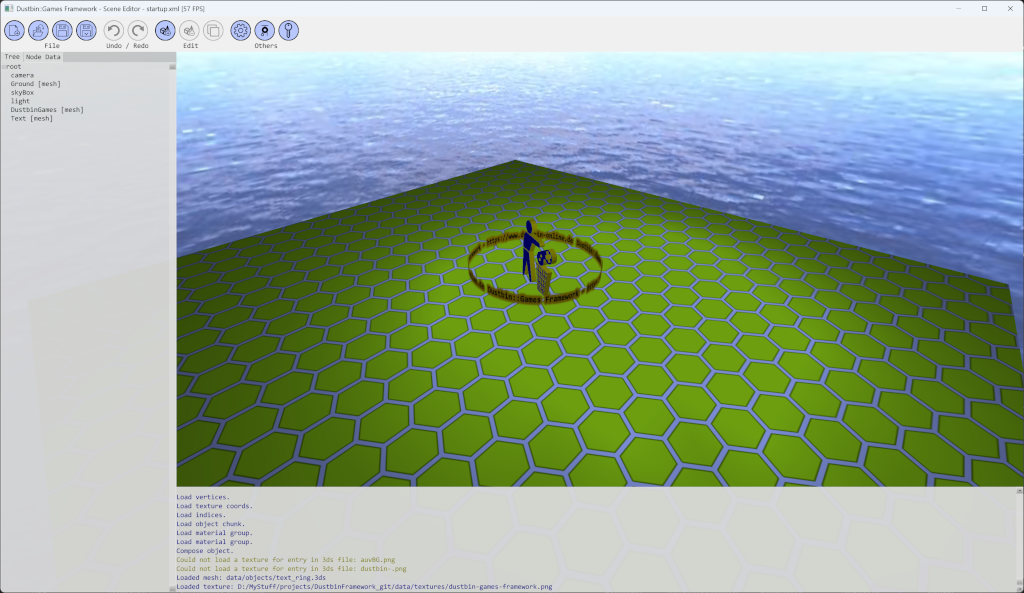
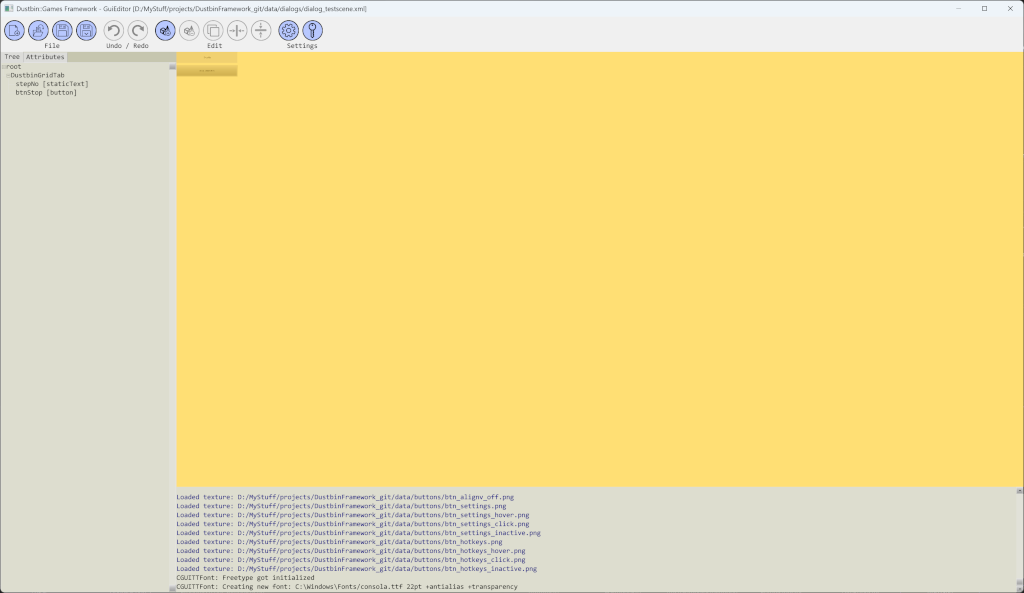
Here is a screenshot of the GUI editor (not spectacular, I know)
Image

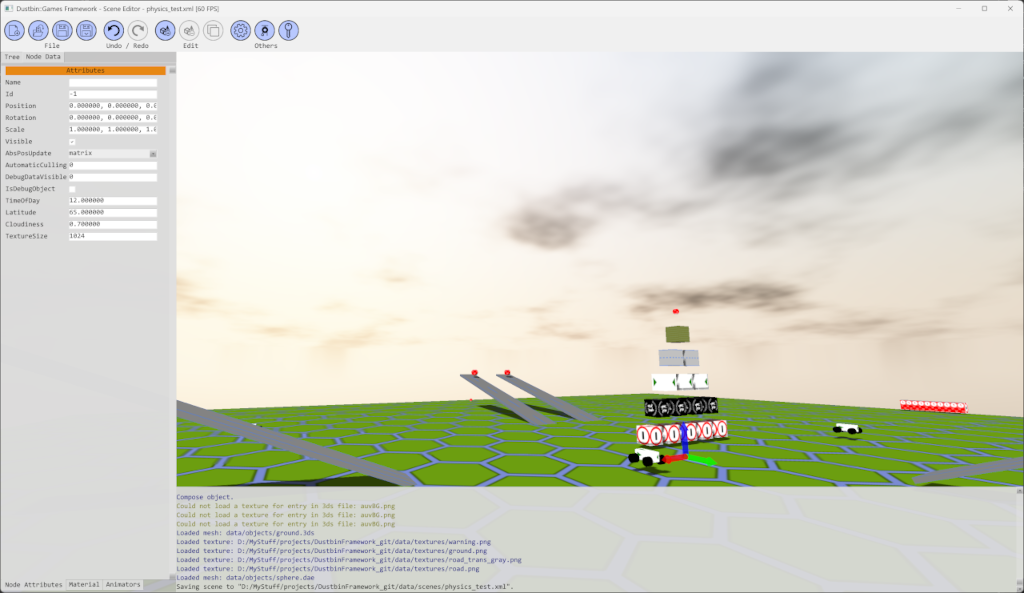
And a screenshot of the scene editor
Image

What do you think of this?
Image
Dustbin::Games on the web: https://www.dustbin-online.de/
CuteAlien
Admin
Posts: 10066
Joined: Mon Mar 06, 2006 2:25 pm
Location: Tübingen, Germany
Contact:

Re: The Dustbin Framework

Post by CuteAlien »

Having a scene editor with which you are familiar is always good. I remember back when I did my H-Craft editor I never expected to use it for anything else as it was a bit primitive. But turned out even a simple editor beats doing scenes by hand and I used it in another project later :)

As for the framework part.. I don't know. Tell us if it was useful if you ever do another project with it :-) I'm more of a copy-paste guy so far (check old projects, look what's useful). Stuff like a good command system can be helpful. The tricky part often turns out to define the exact meaning of what it should handle. What's an action, what's a command (like does the user do commands and those trigger actions or other way round - I've seen both...), can they be chained, how are commands and events related (or not at all), stuff like that.

Anyway - thanks for making it free!
IRC: #irrlicht on irc.libera.chat
Code snippet repository: https://github.com/mzeilfelder/irr-playground-micha
Free racer made with Irrlicht: http://www.irrgheist.com/hcraftsource.htm
Brainsaw
Posts: 1270
Joined: Wed Jan 07, 2004 12:57 pm
Location: Bavaria

Re: The Dustbin Framework

Post by Brainsaw »

My main idea with the scene editor is that I can integrate the actual game into it, like for a car racing game you have a track editor and you can test your track without changing the application. The project "SceneEditor_ODE" has physics built in, and the "Test Scene" button copies the whole scene and starts a simulation with that copy. I want to start a demo project soon, like a simple car racing game ;) , mainly for me as a test on how it works out, and as a demo of course.
I also used the copy-paste approach a lot, but at some point I realized that I should have had a stricter system dividing things up, at the moment adding new features to MarbleGP is really hard because I just coded without those ideas in the back of my head, so it got really complicated

I already had a command system in some old projects, but there was always a single active command, now it's a stack and all of them are active. This way it should be easy to change things, e.g. if you have a game which includes a replay system you only change the command at the very bottom which normally does the physics calculation and sends messages with the changes to the other command and replace it with a command which reads the physics messages from a file and send those to the other commands.

I've been using a message based system for a long time and it always worked for me, but this time I tried to go a bit further. I also tend to forget the initialization of certain classes, e.g. registering a scene node factory, so I automated that.
Image
Dustbin::Games on the web: https://www.dustbin-online.de/
Brainsaw
Posts: 1270
Joined: Wed Jan 07, 2004 12:57 pm
Location: Bavaria

Re: The Dustbin Framework

Post by Brainsaw »

Fun story: when trying to use the Scene Editor (ODE) inclulded in the framework picking nodes and using the move arrows did not work. When I switched back from my Dustbin Shaders to default Irrlicht rendering it worked. As I was completely clueless at first I asked google AI, and it told me that there are problems with custom materials (aka "My Shader"). After trying some solutions and debugging a lot it turned out the I simply need to reset the viewport to it's original value. Node picking and the movement arrows do now work again
Image
Dustbin::Games on the web: https://www.dustbin-online.de/
Brainsaw
Posts: 1270
Joined: Wed Jan 07, 2004 12:57 pm
Location: Bavaria

Re: The Dustbin Framework

Post by Brainsaw »

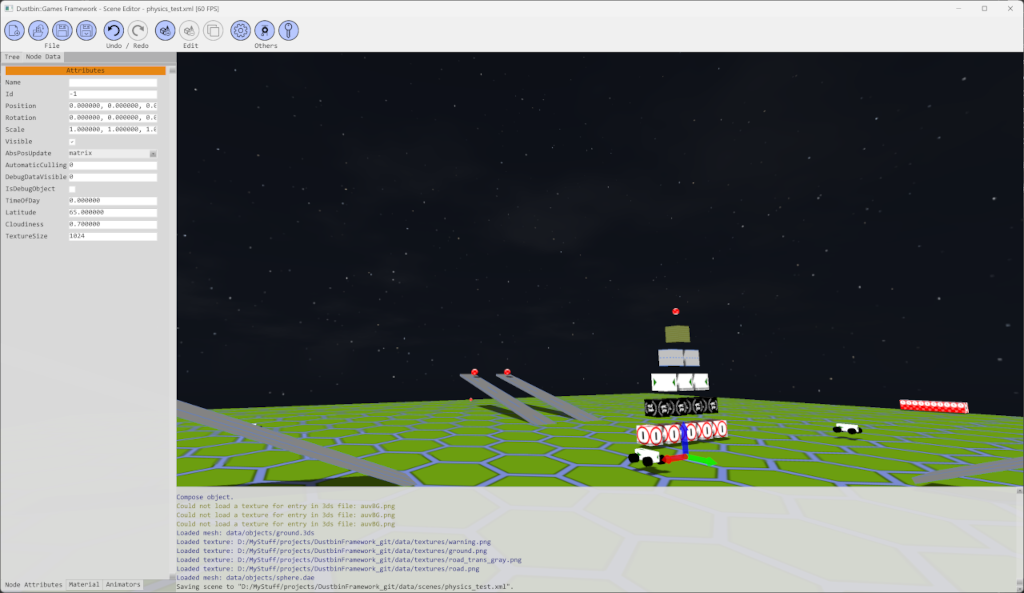
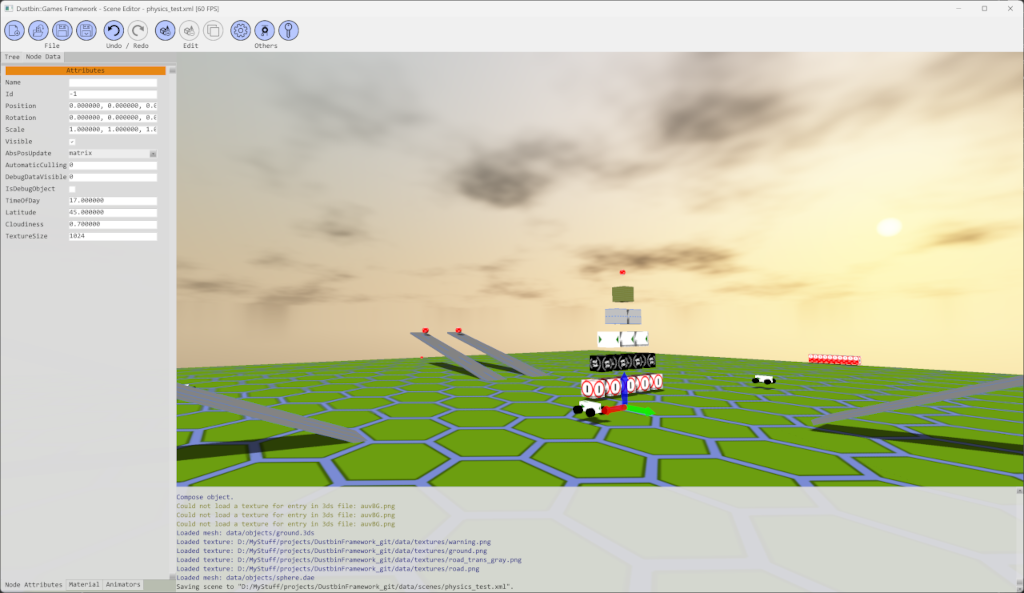
Yesterday I did a test and had Google Antigravity AI code a custom skybox scene node which generates the sky on the fly. I like the result (it's not the best but reasonable) so I added it as a module to the framework. If you are interested in trying it in your own project feel free to do so (https://sourceforge.net/p/dustbinframew ... ne_skybox/). It's a total of 5 files which can easily be extracted as they have no dependencies except for Irrlicht. Here are some examples:
Image
Image
Image
Image
Dustbin::Games on the web: https://www.dustbin-online.de/
Noiecity
Posts: 429
Joined: Wed Aug 23, 2023 7:22 pm
Contact:

Re: The Dustbin Framework

Post by Noiecity »

Brainsaw wrote: Tue Oct 20, 2026 3:04 pm Yesterday I did a test and had Google Antigravity AI code a custom skybox scene node which generates the sky on the fly. I like the result (it's not the best but reasonable) so I added it as a module to the framework. If you are interested in trying it in your own project feel free to do so (https://sourceforge.net/p/dustbinframew ... ne_skybox/). It's a total of 5 files which can easily be extracted as they have no dependencies except for Irrlicht. Here are some examples:
Image
Image
Image
I can’t see the images, it looks as though the link is down
Irrlicht is love, Irrlicht is life, long live to Irrlicht
Brainsaw
Posts: 1270
Joined: Wed Jan 07, 2004 12:57 pm
Location: Bavaria

Re: The Dustbin Framework

Post by Brainsaw »

It seems that they are online again, I created a sub-domain https://forumimages.dustbin-online.de where I host the images for this forum. Can you access that page?
Image
Dustbin::Games on the web: https://www.dustbin-online.de/
Noiecity
Posts: 429
Joined: Wed Aug 23, 2023 7:22 pm
Contact:

Re: The Dustbin Framework

Post by Noiecity »

yes, thanks
Irrlicht is love, Irrlicht is life, long live to Irrlicht
Brainsaw
Posts: 1270
Joined: Wed Jan 07, 2004 12:57 pm
Location: Bavaria

Re: The Dustbin Framework

Post by Brainsaw »

I have now spent a lot of time in the past weeks improving my framework and creating a first test app. The framework can still be found under https://sourceforge.net/p/dustbinframew ... ster/tree/. Apart from fixing a bug or two I found I have greatly improved the wizard which creates necessary data and source file. Before there were 2 independent scripts which had to run
  • a wizard (or commandline app) to create a specific CMakeLists.txt file with the project configuration
  • a commandline script which generates the messages and message handling interfaces I use
I have used AI to compile these scripts into a single wizard (I don't like UI programming in Python - and large Python projects generelly), and I have updated a lot of the documentation (AI is really good creating feasable documentation I have to admit - also something I normally skip just to regret it a few month later). As sourceforge (at least my projects) seems to not show diagrams embedded in the markdowns I also had AI create a HTML file as documentation, and I must admit this is really good. I put it on my webspace: https://dustbin-online.de/framework/. It's also part of the project on sourceforge, but it's better to see on a normal website.

As for the wizard I have created:

Image
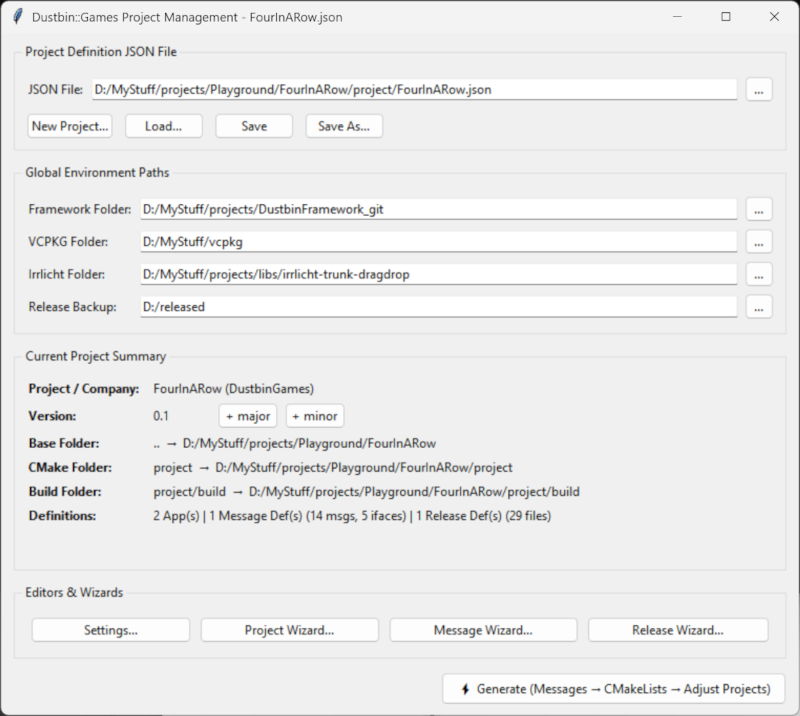
This is the main window of the application. On top you can select a JSON project definition which is created by this app and stores all necessary data. Some global settings. On the bottom you have buttons for the global settings, project settings, messages and release. I also added the possibility to track versions here (helpful especially if someone says "doesn't work" and you can say "try the latest version")

Image
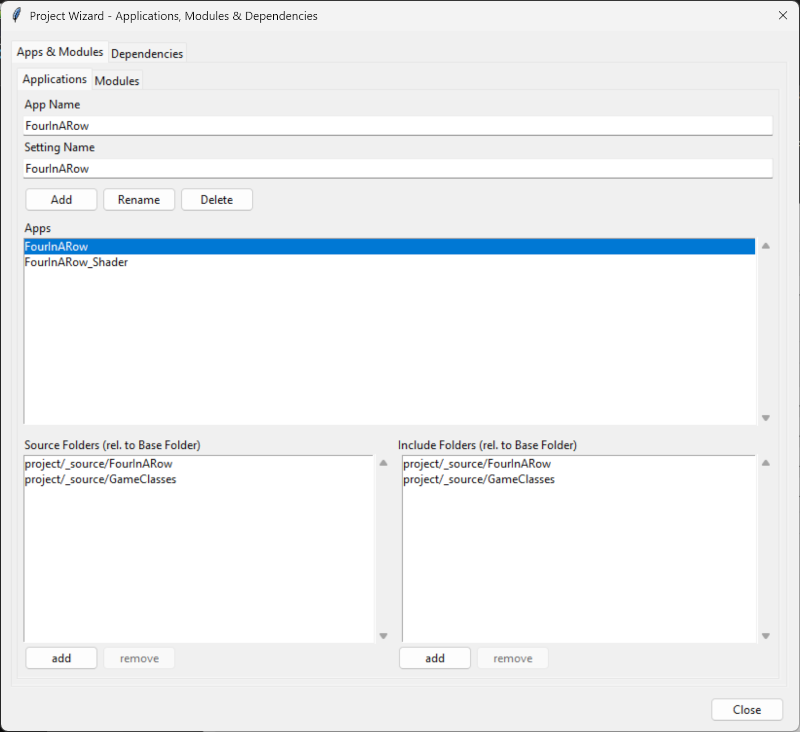
This is the apps window. Here you can define which apps you want to create and define their source and include folders. On the modules tab you can select which modules you want to have linked to your app, and "dependencies" gives you an overview over what's really linked as some modules depend on other modules.

Image
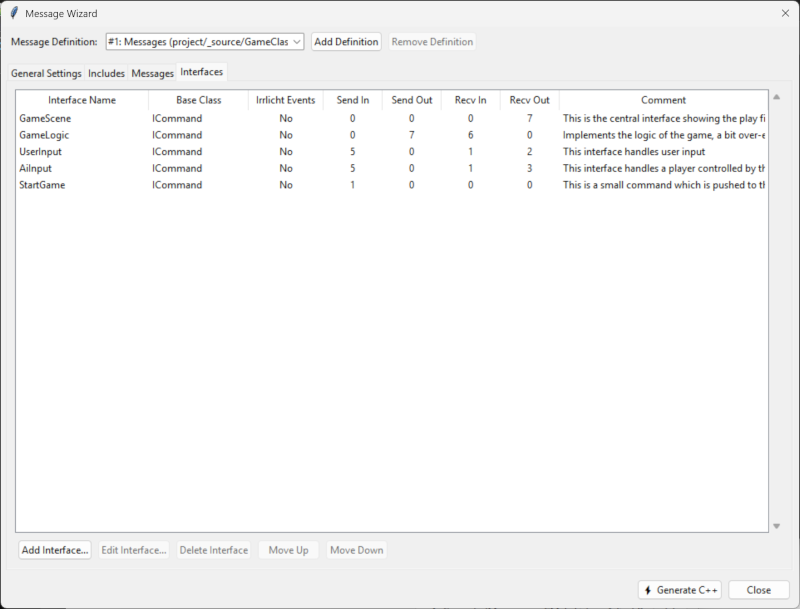
This is the "interfaces" tab of the "Message Wizard". The documentation created by AI is really good in explaining the messages, but you define messages which are sent from one command to another, and you define which command sends and receives which message. The image shows an overview over the interfaces used for my test and demo game

Image
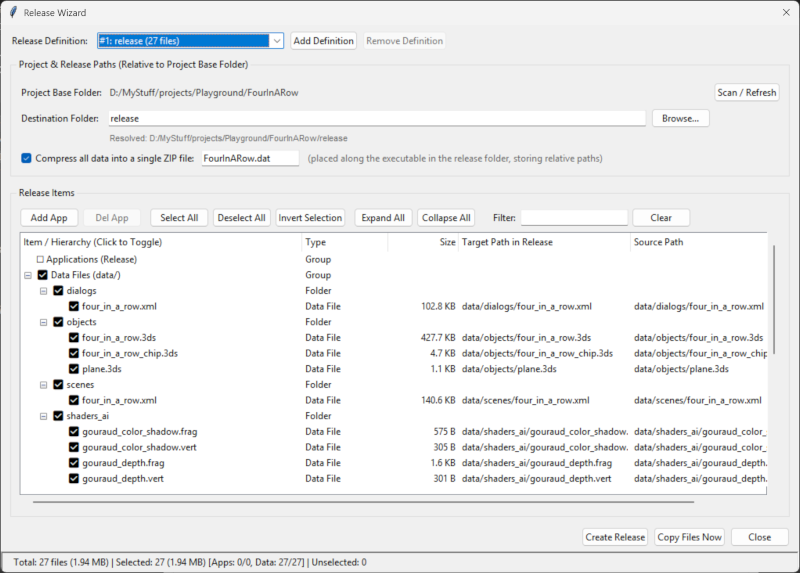
The last image for this post shows the definition of the installers. You define which files you want to have in the installer, the "Copy Files Now" button copies all files to the folder defined in "Destination Folder" and "Create Release" copies the files as well and compresses them to a ZIP archive. I am going to add more options there so you can create a Windows installer or whatever is necessary for Linux as well, but at the moment only ZIP archives are possible

I hope you like my progress
Image
Dustbin::Games on the web: https://www.dustbin-online.de/
Brainsaw
Posts: 1270
Joined: Wed Jan 07, 2004 12:57 pm
Location: Bavaria

Re: The Dustbin Framework

Post by Brainsaw »

I made another update to my framework. For one it now compiles on a Raspberry Pi, the second update is for the project management Python script (As it's Python it was done by AI ;) ).

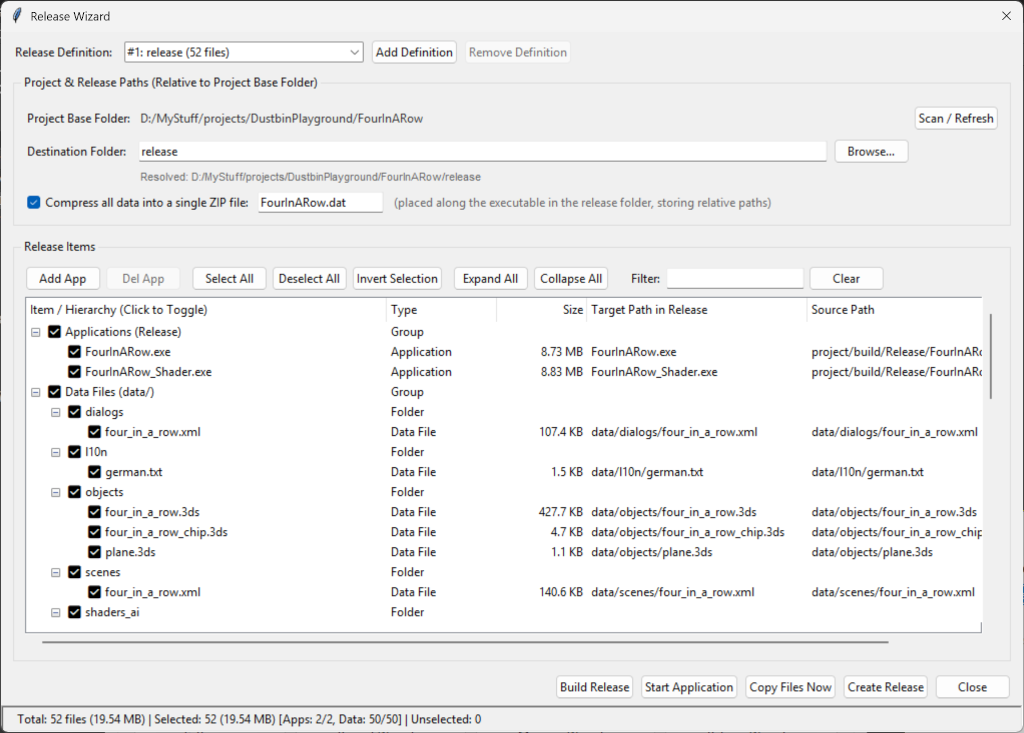
I have added two buttons to the "Release Wizard" window:
  • Build Release: this button builds all apps defined in the project JSON in release mode
  • Start Application: lets you select and run an application of the project
Image

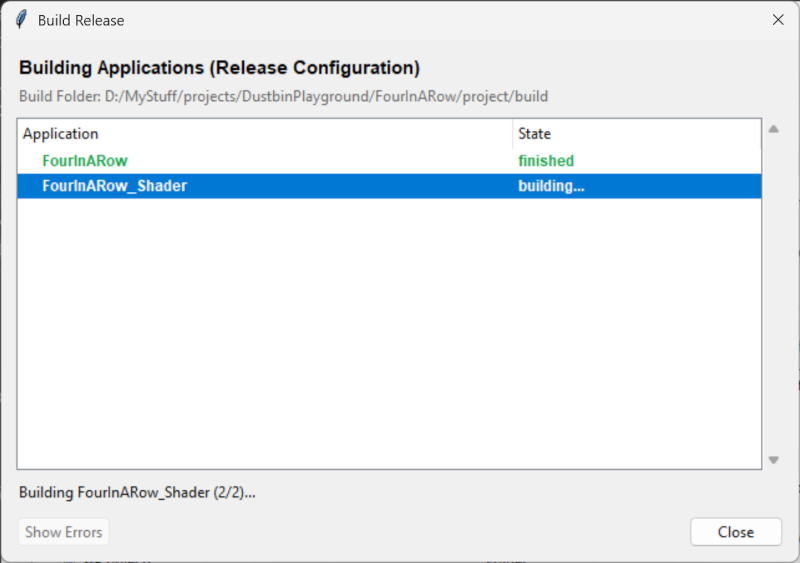
The "Build Release" button opens a window which shows the list of the applications in the project and their current state (pending, building, finished and error). If an error occurs you can check the errors with the button on the left bottom side. The applications are built in Release mode

Image

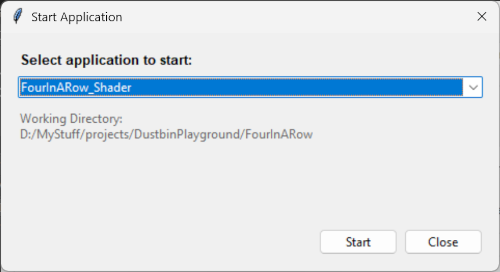
The "Start Application" dialog is not spectacular, it shows a window with a combobox to select which application to start. Nice for testing before you release it

Image

There is also a "CreateProjectFiles.py" script which has no UI. It takes a project JSON as input parameter, prepares a build (i.e. generates and the project files which are auto-generated), compiles all apps in release mode and copies those apps marked for release to the destination folder defined in the release wizard. This way it is possible to automate building releases. It stops after copying the files to the release folder so that a user (or admin) can include it into a workflow which afterwards signs the apps and creates the necessary installers.

I think I am making progress :D
Image
Dustbin::Games on the web: https://www.dustbin-online.de/
Post Reply