Page 5 of 7
Posted: Sat Apr 02, 2011 12:01 pm
by Mel
viejodani wrote:One thing that impressed me was the scale and good detail this game has one relatively low hardware like Nintendo Wii
http://www.youtube.com/watch?v=vRGh8Vv7HRE
Good art assets here to compensate the low polygon capacity
Monolith Soft has a tradition of great looking games (Chrono Cross on PS1, when they were still under the protection of Square Soft, Xenosaga on PS2 with some of the best visuals on a system even more limited than wii, Baten Kaitos on Wii too after they were bought by Nintendo), and their visual FX are also notable. Many people tend to forget the content and focus only on the technic aspect of their programs, and that's a mistake.
Wii is limited graphics-wise (for the current standards, anyway, 10 years ago those graphics were outstanding), But it is great to see games with such rich environments.
Posted: Sat Apr 02, 2011 12:05 pm
by hendu
serengeor wrote:hendu wrote:On the topic of what the wii can do, I was rather amazed by Dead Space: Extraction. It looks just as good as DS on PS3, I couldn't spot much difference (obviously there must be lower-res textures etc, but couldn't really spot anything).
Maybe they just didn't made much of a change when porting it from wii to ps3.
It wasn't ported _from_ the wii; it was made for the wii, using some of the existing assets of the first game.
Posted: Tue Apr 05, 2011 3:46 am
by patricia3d
Blood Drippings
http://www.youtube.com/watch?v=B5b8moyx ... detailpage
I can also give Transparent Background Mov with required Frame Rate Blood Drippings.
Posted: Wed Apr 20, 2011 12:46 pm
by Radikalizm
Yay! I completed my work on flexible render passes for my engine

Here's a shot showing off transparency in my deferred renderer using the FRPs

Posted: Wed Apr 20, 2011 12:49 pm
by serengeor
Looks so nice!

Posted: Wed Apr 20, 2011 1:14 pm
by Radikalizm
serengeor wrote:Looks so nice!
Thanks, appreciate it
Posted: Thu Apr 21, 2011 12:18 pm
by omaremad
If any one has a copy of shaderx7 it would be great to know how they managed radiosity with a dynamic scene with AO included, the technique doesnt look like post process since the blue light is visbile on the players without the blue cube being on view
Fast Fake Global Illumination Demo for ShaderX7 (2008)
http://www.youtube.com/watch?v=CbGmsMmXack
Posted: Thu Apr 21, 2011 7:46 pm
by ent1ty
I'm not exactly sure how it works, but it includes having spheres throughout your entire scene

I guess they perform the lighting on the spheres and then reflect their color back into the scene and vice versa
Posted: Sat Jun 04, 2011 10:47 pm
by omaremad
Posted: Sat Jun 04, 2011 11:26 pm
by Mel
Fairly impressive. The actual speed is a bit slower though, But it is a GI calculation (with all the features enabled, like SSS, or diffuse reflections) completely done on the GPU. The quality achieved is great, comparing it with the time a similar render would take using just the raw CPU power, and leaving the render process further more creates much realistic scenes. Great.
Posted: Tue Jun 07, 2011 1:07 am
by Radikalizm
Speaking of GI, I've set up a demo to optimize my lighting pipeline
I've fixed some minor bugs in my light accumulation and optimized my SSAO and SSGI techniques; the SSGI used to give me a rather fuzzy output which I had to mask with other post-processing effects, but I got around to fixing and optimizing it, giving me a nice quality and speed boost

It's just one bounce of GI done in screen space, which has some severe limitations, but I can't be bothered with implementing a full-blown GI system just yet
Posted: Tue Jun 07, 2011 7:57 am
by ent1ty
Imho that's the worst scene for testing SSGI ever

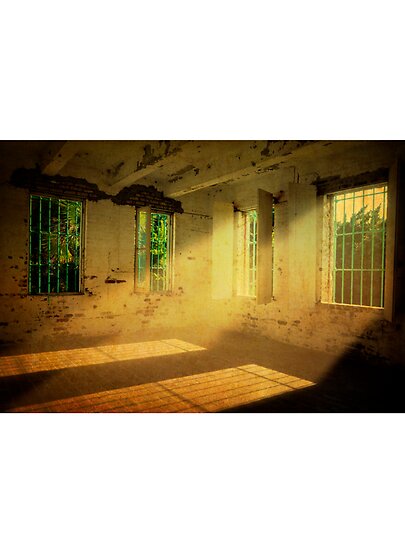
EDIT: As I've already told devsh, i think you should go for something like this
Posted: Tue Jun 07, 2011 11:19 am
by Radikalizm
ent1ty wrote:Imho that's the worst scene for testing SSGI ever
I needed a room with bright color contrasts so I could get a clear view of the light actually being bounced correctly, and it worked out perfectly as you can see the green of the left wall bleed through on the floor and on the back wall
The scene you suggested would be nice to test a tonemapping algorithm since there's a lot of detail to preserve, there is however no drastic color contrast in that scene so the effects of a SSGI implementation would be rather subtle and hard to check for correctness
Posted: Tue Jun 07, 2011 11:47 am
by ent1ty
Ok, if not that, then something like this

Anyway, will you be sharing the source?
Posted: Tue Jun 07, 2011 11:55 am
by Radikalizm
I will be required to make a more complex scene in the end if I want to fully test and stress my lighting pipeline, so don't you worry
And I'm not releasing anything until I'm completely satisfied with it, and I'm not really fond of the idea of having to solve other people's problems with it once I release it either, so there are no plans for doing that just yet
I could however explain how it works, it's rather similar to SSAO tbh

