Page 1 of 1
howto create boundaries around map? DONT allow swimming
Posted: Mon Jul 16, 2007 4:21 pm
by Georgian
hi,
i have my project on island and i want to create something like a boundary around a map so that my camera will be forbidden to go in water or jump of a dock into water any ideas?
thanks.
Posted: Mon Jul 16, 2007 4:34 pm
by JP
You could do a tile/cell based approach where you create a very low-level 'map' of your environment by simply having a boolean 2D array which you then mark in each cell of the array whether that part of the world is allowed to be entered. Here's a little pic to show what i mean:
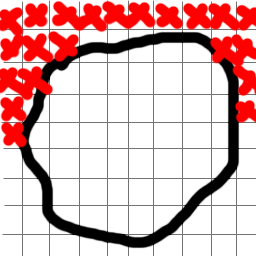
So the grid is just overlaid on a sketch of what your island might look like and then the crosses mean cells you're not allowed to enter (didnt fill them all in)
get the idea?
Posted: Mon Jul 16, 2007 4:40 pm
by Georgian
thanks i get the idea

Posted: Mon Jul 16, 2007 8:12 pm
by Acki
I have another idea...
you can create an invisible (full transparent) mesh for the border and add it to the physics (collision)...
so if you try to pass the border you hit the invisible "wall" and can't go further...

Posted: Tue Jul 17, 2007 8:26 am
by JP
That's a good idea too. I suppose it could depend on how complicated that mesh would end up as to how well that would perform. I imagine the grid would be better performance as it's just working it out the cell you're in from your position and then checking a boolean value which i imagine would be quicker than doing collision detection on what could be a huge mesh.
Posted: Tue Jul 17, 2007 8:43 am
by roxaz
and you could check object coordinates and compare to predefined min x;y and max x;y every frame, and then if object goes out or bounds - kick it back or freeze it or do whatever you want
Posted: Tue Jul 17, 2007 8:50 am
by arras
Actualy he can combinate those two aproaches, split that invisible mesh in to sectors, then test in what sector camera is and make collision detection with appropirate part of invisible mesh ...if that sector contain it al all. That way he can keep performance high.
Posted: Tue Jul 17, 2007 12:02 pm
by JRowe47
If water is done per height level, then simply don't allow the camera/player object to go below a certain level...
rough pseudo logic:
if the next "step"(frame) would take you below the shoreline, then return to last camera/player object position.
Devise some method of preventing choppiness when at a border height (running into the shoreline, for example.)
This method would have the advantage of being applicable to other maps, requiring only data that already exists, and 0 custom work done to achieve the desired results.
Also, no matter what, you'll need invisible walls around docks and structures that extend over the water. Instead of implementing physics, however, simply do a "zoned" approach. Create a zone area, with 3 lines representing the "walls" that restrict movement.
If the player/camera is "inside" the lines, then prevent motion beyond them. Make sure you make it slippery when you contact a border, so that the camera doesn't stick in one spot.
No other check should be needed.
Posted: Tue Jul 17, 2007 2:34 pm
by Georgian
well thanks for ideas all of them are good, and the easyest would be JRowe47's idea about water level, but i also have a volcano on top of island so i think ill be using the grids. or invisible walls, ill try to make my islands boxlike.
Posted: Tue Jul 17, 2007 3:07 pm
by sudi
well a better idea would be to check if the player is above the land and stop moving him when he leaves the land. just do a raycast down