Page 1 of 1
Primitives - Too many Triangles... (Solved)
Posted: Sun Dec 16, 2007 10:25 am
by RanBK
I exported a terrain mesh from Max Studio in my3d format. When I try to load it into my test application I get a stream of errors in the console:
Could not draw triangles, too many primitives(2000000), maximum is 1048575.
I tracked the error down to this section of code and it has raised a few questions:
Code: Select all
//! Returns the maximum amount of primitives (mostly vertices) which
//! the device is able to render with one drawIndexedTriangleList
//! call.
s32 CNullDriver::getMaximalPrimitiveCount()
{
	return (1<<30)-1;
}


//! checks triangle count and print warning if wrong
bool CNullDriver::checkPrimitiveCount(s32 prmCount)
{
	s32 m = getMaximalPrimitiveCount();
	if ((prmCount-1) > m)
	{
		char tmp[1024];
		sprintf(tmp,"Could not draw triangles, too many primitives(%d), maxium is %d.", prmCount, m);
		os::Printer::log(tmp, ELL_ERROR);
		return false;
	}

	return true;
}
1. Why is a null device being used when I selected DirectX 9.0c? Is this an automatic fallback? Id the D3D device failing to create???
2. The maximum primitive count is hardcoded rather than being obtained from a query. Why?
The mesh renders fine in Max, I doubt its a hardware issue. I'm using 768MB Nvivia GTX8800 xXx, so there is enough horsepower.
Are there any hardcoded limits I can alter that will allow the loading of huge terrains (i.e. 150MB or more)?
Posted: Sun Dec 16, 2007 12:14 pm
by hybrid
The hardware drivers are derived from NullDriver. Hence, some virtual methods which are not implemented in the HW drivers are used from NullDriver, such as the primitive count. You're using an older version of Irrlicht which limits the number of triangles in an artificial way, so I'd suggest to change to 1.4 first.
However, having 2M tris on the screen will also limit your frame rate a lot, even if they are set up properly for several mesh buffers. So besides avoiding the internal limitation of Irrlicht you should definitely think about reducing your polycount.
Posted: Sun Dec 16, 2007 12:34 pm
by RanBK
Thanks for the reply. I'm actually using 1.4. I grabbed that code segment from koders.com not realising it was an earlier revision of the file.
Here is the code from 1.4:
Code: Select all
//! Returns the maximum amount of primitives (mostly vertices) which
//! the device is able to render with one drawIndexedTriangleList
//! call.
u32 CNullDriver::getMaximalPrimitiveCount() const
{
	return 0xFFFFFFFF;
}


//! checks triangle count and print warning if wrong
bool CNullDriver::checkPrimitiveCount(u32 prmCount) const
{
	const u32 m = getMaximalPrimitiveCount();

	if (prmCount > m)
	{
		char tmp[1024];
		sprintf(tmp,"Could not draw triangles, too many primitives(%u), maxium is %u.", prmCount, m);
		os::Printer::log(tmp, ELL_ERROR);
		return false;
	}

	return true;
}
Ok, so this was changed to return 0xFFFFFFFF, or 4294967295, so why am I getting an error about the maximum being 1048575????
I'm not really worried about the framerate at this point. By the time I have this finished, hardware will have moved on a bit. 2 million triangles is only the beginning, that's just the terrain, nothing else. I've still got a lot of static meshes to insert into the scene, as well as animated characters, etc.
Right now, I'm just interested in getting this mesh loaded.
Are there any hacks I can use to expand the limit?
As an alternative, is there any way to reduce the triangle count within max, without reducing the quality of the terrain (i.e. anything I can merge)?
Posted: Sun Dec 16, 2007 3:28 pm
by RanBK
I examined the entire solution and the following code is the only segment which generates this constant:
Code: Select all
u32 CNullDriver::getMaximalPrimitiveCount() const
{
	return 0xFFFFFFFF;
}
If I select DirectX 9.0c it returns 0x000FFFFF (1048575 or 4294967295 / 4096) and if I select OpenGL 1.5 it returns 0x0000FFFF (65535 or 4294967295 / 65537).
Anyone know how this value is being altered???
Posted: Sun Dec 16, 2007 3:45 pm
by RanBK
Just a thought...has the dll that comes with the SDK been 'tweaked'???
Posted: Sun Dec 16, 2007 4:33 pm
by hybrid
No, the getMaximalPrimitiveCount is just defined per device by a virtual method. However, this number is meant per draw call. And since Irrlicht uses 16bit indices you can only draw 65535 vertices per draw call. At least you cannot use more than the first 65535 vertices.
So now that you know why it returns this number (which is, btw, taken from the d3d caps) you can also deduce why it's being displayed: You have a too large meshbuffer. Simply split it into several meshbuffers, each must not have more than 65535 vertices. This should be done in the 3d modeller, because the loaders don't support proper splitting, yet.
Posted: Mon Dec 17, 2007 4:38 am
by RanBK
Thanks Hybrid, things are beginning to make more sense now...
If I have this correct, when loading a mesh into memory it is assigned to a buffer that contains at maximum 65535 vertices.
So, to load a mesh with 2 million vertices, I would need to break it up into around 30-35 separte pieces (65535 vertices each) and assign each one a separate mesh buffer.
Is this correct?
With a single mesh, I simply create a single scene node and attach the mesh to it.
Does this mean I need to create 30-35 scene nodes and then align them?
Can I set each mesh as a child node of a single scene node???
If so, can I use the 'setvisible' method to effectively reduce the draw distance?
Posted: Mon Dec 17, 2007 5:43 am
by vitek
RanBK wrote:Does this mean I need to create 30-35 scene nodes and then align them?
No.
RanBK wrote:Can I set each mesh as a child node of a single scene node???
Yes. A mesh scene node holds and displays a mesh. A mesh can hold multiple mesh buffers. Each mesh buffer holds the vertex buffer and index buffer arrays. Each mesh buffer essentially has a maximum of 65535 vertices.
RanBK wrote:If so, can I use the 'setvisible' method to effectively reduce the draw distance?
The
setVisible() call does nothing to the draw distance. I don't know what you're getting at.
You could theoretically split the terrain into tiles and then use a quad tree culling algorithm to efficiently cull tiles that are not visible.
Travis
Posted: Mon Dec 17, 2007 9:53 am
by RanBK
Yes. A mesh scene node holds and displays a mesh. A mesh can hold multiple mesh buffers. Each mesh buffer holds the vertex buffer and index buffer arrays. Each mesh buffer essentially has a maximum of 65535 vertices.
Ok, I was thinking that a mesh was a mesh buffer. Then each mesh would be applied to a scene node. Thus, in a large environment, you could setVisible to false and not render the furthest meshes.
Thanks for clearing that up.
Now that I have this straight, the question is how is this implemented in code. The following code snippet loads a my3d mesh into memory:
Code: Select all
	//Load .my3d mesh

	// setting path to textures
	smgr->getParameters()->setAttribute(scene::MY3D_TEXTURE_PATH, "myTexturePath");

	// loading my3d mesh
	scene::IAnimatedMesh* mesh = smgr->->getMesh("testscene.my3d");

	//Add to the scene
	scene::ISceneNode* node = 0;
	node = smgr->addAnimatedMeshSceneNode(mesh);
What do I do to setup a mesh buffer and assign those buffers to a mesh?
Also, does anyone have any idea of how to export a mesh from Max Studio in a form that would be acceptable for a mesh buffer?
Posted: Mon Dec 17, 2007 10:06 am
by hybrid
Well, my3d is a pretty specific format in that it does not support some features other formats provide. I don't think that it supports "groups", instead it just decides about mesh buffers based on the material. So you will have to assign different materials for each part of the terrain that belongs to another mesh buffer.
Besides that, my3d also seems to do automatic splitting. However, it does so based on the getMaximalPrimitiveCount, hence it only splits at 1M tris in your case. As a first try you could change the D3D9Driver method to return the minimal value of 65535 and the caps value. This should break up your mesh into several meshbuffers. However, it might create some seams in the mesh and make use of some methods harder.
Posted: Mon Dec 17, 2007 11:43 am
by RanBK
Well, my3d is a pretty specific format in that it does not support some features other formats provide. I don't think that it supports "groups", instead it just decides about mesh buffers based on the material. So you will have to assign different materials for each part of the terrain that belongs to another mesh buffer.
The materials on my terrain are blended and cover the entire the mesh using heightmaps. Trying to break it up is not only awkward, but also means duplication.
Is there a better format or method?
How can I reduce the vertex count, without impacting quality?
Posted: Mon Dec 17, 2007 12:11 pm
by RanBK
Nevermind...I found a method to reduce the number of faces in Max by lowering the number of segments. Got it down to 20,000 and it still renders perfectly in Max.
I have a different issue now though...
When the mesh loads, it almost looks perfect, that is, until you move close. The textures appear messed up, almost like a liquid kaleidoscope effect. Its not until you zoom out when overhead do you see what is going on.
The textures are being applied to different heightmaps, but it is not performing the blending well. The first texture (bottom) remains static and follows the camera. So, no matter where you are looking on the mesh, you always see the texture from the same angle.
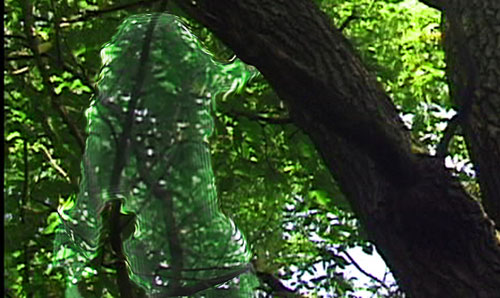
Above this you can see the second texture, however, it appears distorted. Almost like the cloaking device from the Predator, it distorts the lower texture.
See this image of the Predator's cloak for an example:
http://www.ohgizmo.com/wp-content/uploa ... dcloak.jpg
It would be a cool effect if that was what I wanted at this point.
Any ideas as to the cause???
Posted: Mon Dec 17, 2007 12:52 pm
by RanBK
I just tried the same thing with a .3ds file. The terrain exports correctly, however, the texture does not blend properly.
I simply get the two textures blended together and tiled once over the entire terrain. Basically, texture1 should be in the low areas and texture 2 in the high areas. Both textures should tile 100 times.
Any idea why the textures are not tiling, or blending, correctly?
Posted: Mon Dec 17, 2007 2:16 pm
by RanBK
I found the solution to the .3ds texturing problem:
http://irrlicht.sourceforge.net/phpBB2/ ... tile#72058
I still don't have a solution to the my3d issue, but I guess its now moot as I can export in .3ds.
Posted: Mon Dec 17, 2007 2:33 pm
by hybrid
Correct, the 3ds tiling was not yet implemented because of lack of examples. It will be features in the next release.
The other problem might be hard to solve. There's somtimes a limitation in the format itself, such as my3d not supporting tiling at all. The format simply does not have such data fields.
The blending issues are not clear to me, maybe upload some screenshots of how the terrain should look like and now looks like. Also, access to the meshes (including textures) would help, because I'd need to know the materials which are used.