Page 1 of 1
Clipping problem.
Posted: Thu Apr 29, 2010 1:20 pm
by egglord3344
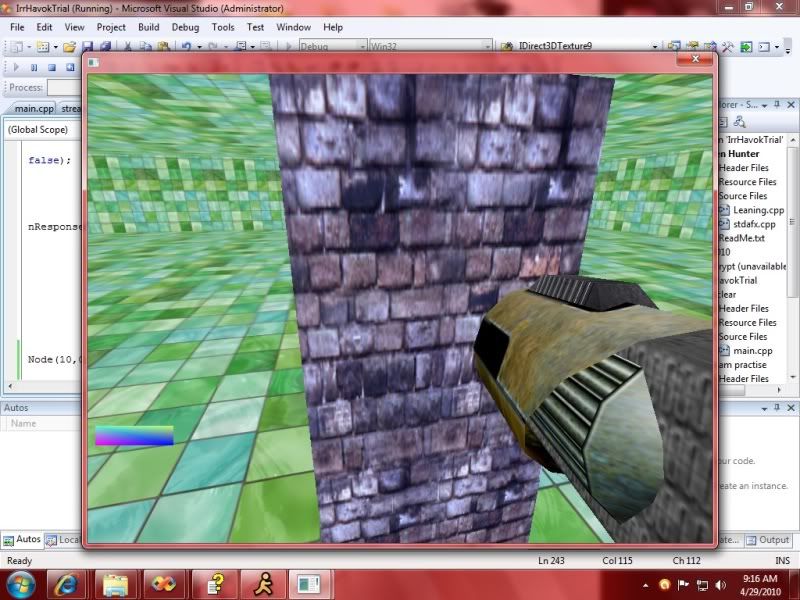
as you can see the gun seems to go right through the column when it's not suppose to, wonder if it's because it's the child of another scene node or i forgot to set a flag to enable clipping or what ever it's called? (Z enable?) anyways, hope you guy can help me, i've basically did everything my self programatically but have a long ways to go, just want to fix this clipping issue.[/img]
Posted: Thu Apr 29, 2010 2:55 pm
by slavik262
The z-buffer just tries to assure that objects are drawn over the ones behind them. It doesn't prevent objects from going through each other. To stop that you should take a look at collision detection.
Same Problem
Posted: Sat Mar 19, 2011 8:13 pm
by joshua1091
Same problem here ...
I did slight modifications to the "Loading Scenes from .irr Files" example
First i iterate through all the nodes available in the scene, and for nodes of type ESNT_MESH (the gun is an IMesh), i do the following
Code: Select all
selector = smgr->createTriangleSelector(((scene::IMeshSceneNode*)node)->getMesh(), node);
Then the selector is added to meta selector
Code: Select all
meta->addTriangleSelector(selector);
Then I create an animator,
Code: Select all
	anim = smgr->createCollisionResponseAnimator(
		meta, gunnode, core::vector3df(200,200,200),
		core::vector3df(0,0,0));
	meta->drop(); // I'm done with the meta selector now
	gunnode->addAnimator(anim);
	anim->drop();
But when I execute the code, the camera collision works fine, but the gun clips through the scene contents!!!
Posted: Sat Mar 19, 2011 8:20 pm
by sudi
i guess thats your weapon inside the wall. you can fix that by deactivating the ZBuffer for the gun.
only disable ZBuffer not zwrite!
Still not working
Posted: Sat Mar 19, 2011 8:54 pm
by joshua1091
Hi Sudi, Thanks for the reply.
I tried what you suggested, now it works with opengl, but when i use directx, the gun mesh goes behind everything in the scene. (as if it is in the bottom-most layer, and other objects in the scene are displayed over it!!!)
any suggestions?
Posted: Sat Mar 19, 2011 8:58 pm
by sudi
i guess d3d handles the zbuffer flags different? dunno
do you need d3d? do you have to support both drivers?
Posted: Sat Mar 19, 2011 9:06 pm
by joshua1091
No... not at all...
just coding for fun, thought it would be cool if both the drivers could be used!!!
anyway, thank you... will dig deeper and see if i could find any answer!!
do let me know in case you could think of some solution.
Posted: Sat Mar 19, 2011 9:49 pm
by hybrid
There are only a few little differences when rendering to RTTs. Otherwise, both drivers will behave the same.
Posted: Sat Mar 19, 2011 10:08 pm
by nespa
are You working just with IMesh, not an IAnimatedMeshSceneNode?
Is drawn IMesh?