Ambient Lighting - Possible bug?
Posted: Sat Dec 18, 2010 1:14 am
Hello, I believe I have a problem that could possibly be a bug.
I just recently installed Windows XP Pro on a former Vista computer, and got Visual Studio 2008 Express edition. I got Irrlicht 1.7.2. I also got the latest DirectX SDK. I compiled Irrlicht, set up my enviroment, and began making a simple application. I loaded some models, and set ambient lighting to 0.5 all around.
(For half-lit.) I tested to see it, but the models were completely black! Then, I added a directional light. The light worked how it should, but looked horrible because of the lack of ambient light. (Lit on one side, black on the other.)
I tried these two commands: (smgr is scenemanager, vmgr is videodriver)
Niether worked.
However, emissive lighting seemed to work: (Maria is my model, an IAnimatedMeshSceneNode)
This worked the way I wanted it to, but I'd rather use Ambient Lighting.
This strange problem occurs in both Direct3d and OpenGL.
(But NOT the software renderers.)
Before, when I was using Windows Vista and Irllicht 1.7.1, I had no problems.
Does anyone know what may be causing this? Is it a bug?
Picture:
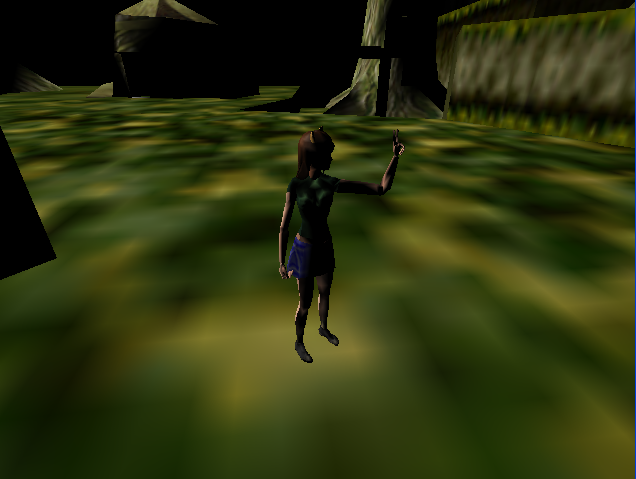
I just recently installed Windows XP Pro on a former Vista computer, and got Visual Studio 2008 Express edition. I got Irrlicht 1.7.2. I also got the latest DirectX SDK. I compiled Irrlicht, set up my enviroment, and began making a simple application. I loaded some models, and set ambient lighting to 0.5 all around.
(For half-lit.) I tested to see it, but the models were completely black! Then, I added a directional light. The light worked how it should, but looked horrible because of the lack of ambient light. (Lit on one side, black on the other.)
I tried these two commands: (smgr is scenemanager, vmgr is videodriver)
Code: Select all
smgr->setAmbientLight(video::SColorf(0.5f,0.5f,0.5f,0.5f));
vmgr->setAmbientLight(video::SColorf(0.5f,0.5f,0.5f,0.5f));However, emissive lighting seemed to work: (Maria is my model, an IAnimatedMeshSceneNode)
Code: Select all
	for (u32 i = 0; i < maria->getMaterialCount(); i++)
	{
		maria->getMaterial(i).EmissiveColor = video::SColor(255,150,150,150);
	}
This strange problem occurs in both Direct3d and OpenGL.
(But NOT the software renderers.)
Before, when I was using Windows Vista and Irllicht 1.7.1, I had no problems.
Does anyone know what may be causing this? Is it a bug?
Picture: