Page 1 of 1
How to disable this thing?
Posted: Sat Mar 09, 2024 8:54 am
by mitras1
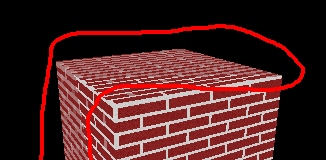
It really hurts my eyes
Re: How to disable this thing?
Posted: Sat Mar 09, 2024 9:05 am
by mitras1
Nvm, you can disable it if you set material flag EMF_USE_MIP_MAPS to false
Re: How to disable this thing?
Posted: Sat Mar 09, 2024 11:12 am
by CuteAlien
Hm, mip-maps are usually good. Try setting AnisotropicFilter to 16 and enable TrilinearFilter for your texture layer in SMaterial. Both are off by default.
Re: How to disable this thing?
Posted: Sat Mar 09, 2024 5:11 pm
by mitras1
CuteAlien wrote: Sat Mar 09, 2024 11:12 am
Hm, mip-maps are usually good. Try setting AnisotropicFilter to 16 and enable TrilinearFilter for your texture layer in SMaterial. Both are off by default.
I can't use TrilinearFilter because of art style but AnisotropicFilter made it perfect. Thanks!

Re: How to disable this thing?
Posted: Sun Mar 10, 2024 3:08 am
by Noiecity
Interesting, I didn't know what could be disabled, I like the filters since my eyes hurt without them