I dont have anything hidden for sureZeuss wrote:try kwxport for 3dsmax if you are stuck with .x format.
That random object is weird, you don't have anything hidden in your scene?
Search found 13 matches
- Tue Apr 22, 2008 6:01 am
- Forum: Everything 2d/3d Graphics
- Topic: I got this strange object when export the .x
- Replies: 6
- Views: 2204
- Tue Apr 22, 2008 3:54 am
- Forum: Everything 2d/3d Graphics
- Topic: I got this strange object when export the .x
- Replies: 6
- Views: 2204
- Sun Apr 20, 2008 7:22 am
- Forum: Everything 2d/3d Graphics
- Topic: I got this strange object when export the .x
- Replies: 6
- Views: 2204
I got this strange object when export the .x

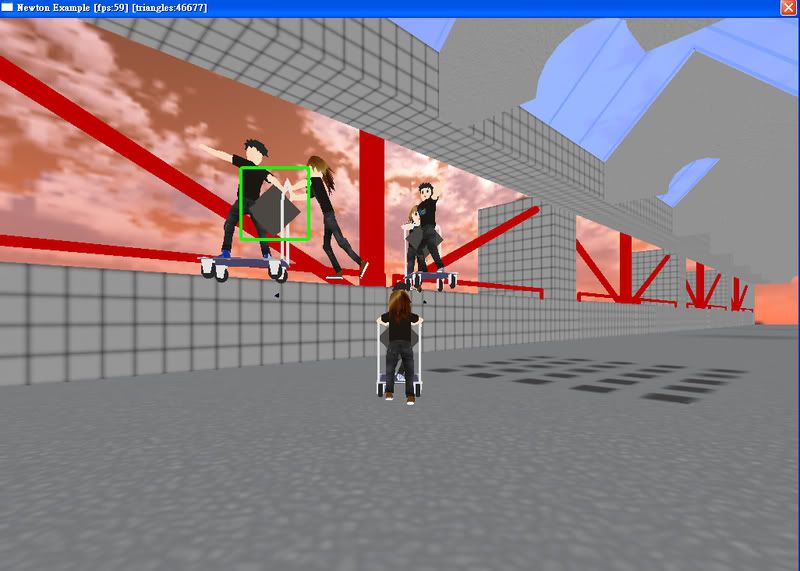
I got this strange object [in green box] when I export the .x file with animation using panda exporter. Everything works fine except this strange object.
What is this and what should I do to remove it?
Many thanks
- Mon Mar 10, 2008 3:11 am
- Forum: Everything 2d/3d Graphics
- Topic: how to export an animated 3d model?
- Replies: 17
- Views: 7706
- Sun Feb 24, 2008 9:04 am
- Forum: Everything 2d/3d Graphics
- Topic: how to export an animated 3d model?
- Replies: 17
- Views: 7706
- Fri Feb 22, 2008 1:39 pm
- Forum: Everything 2d/3d Graphics
- Topic: how to export an animated 3d model?
- Replies: 17
- Views: 7706
ohhybrid wrote:The animation is simply staticAll the frames are exactly the same, so the animation is running, but you won't notice anything...
it's not static
http://rapidshare.com/files/93951495/tu ... y.max.html
- Thu Feb 21, 2008 2:45 pm
- Forum: Everything 2d/3d Graphics
- Topic: how to export an animated 3d model?
- Replies: 17
- Views: 7706
- Thu Feb 21, 2008 1:51 pm
- Forum: Everything 2d/3d Graphics
- Topic: how to export an animated 3d model?
- Replies: 17
- Views: 7706
sorry I was busying other things these days...........killerjacky wrote:i tried to load it into IrrEdit, no sign of animation![]()
omg, i dont know what's wrong
maybe I will upload my mesh here later.
I still cannot make this thing move
the .x file:
ftp://cs_wykac@ihome.ust.hk/smallcube.X
please help
- Wed Jan 30, 2008 3:41 am
- Forum: Everything 2d/3d Graphics
- Topic: how to export an animated 3d model?
- Replies: 17
- Views: 7706
- Mon Jan 28, 2008 9:49 am
- Forum: Everything 2d/3d Graphics
- Topic: how to export an animated 3d model?
- Replies: 17
- Views: 7706
- Mon Jan 28, 2008 8:38 am
- Forum: Everything 2d/3d Graphics
- Topic: how to export an animated 3d model?
- Replies: 17
- Views: 7706
anyone can help me :(
still not fix it yet.
Is there any special sittings required, or something needed to handle when making the model?
by the way, is it that I need to make every frame as a key frame in order to get it animated in .X ? I saw that in the panda site said that the exporter can not ...
still not fix it yet.
Is there any special sittings required, or something needed to handle when making the model?
by the way, is it that I need to make every frame as a key frame in order to get it animated in .X ? I saw that in the panda site said that the exporter can not ...
- Sat Jan 26, 2008 10:26 am
- Forum: Everything 2d/3d Graphics
- Topic: how to export an animated 3d model?
- Replies: 17
- Views: 7706
- Sat Jan 26, 2008 9:34 am
- Forum: Everything 2d/3d Graphics
- Topic: how to export an animated 3d model?
- Replies: 17
- Views: 7706
how to export an animated 3d model?
:(
hi, i'm a newbie here and in 3d games
i'm now making a 3d racing game, and i hv created some animated 3d models with 3d max studio 9
the problem is, how to export the mesh with animation so that it can run in irrlicht ??
i tried to export it in both .3ds and .x format, both do not hv any ...
hi, i'm a newbie here and in 3d games
i'm now making a 3d racing game, and i hv created some animated 3d models with 3d max studio 9
the problem is, how to export the mesh with animation so that it can run in irrlicht ??
i tried to export it in both .3ds and .x format, both do not hv any ...