Another patch to improve normal mapping!

Post those lines of code you feel like sharing or find what you require for your project here; or simply use them as tutorials.
Post Reply
RyanClark
Posts: 15
Joined: Sun Jul 22, 2007 7:34 am
Location: Chicago / Austin
Contact:

Another patch to improve normal mapping!

Post by RyanClark »

Hi all,

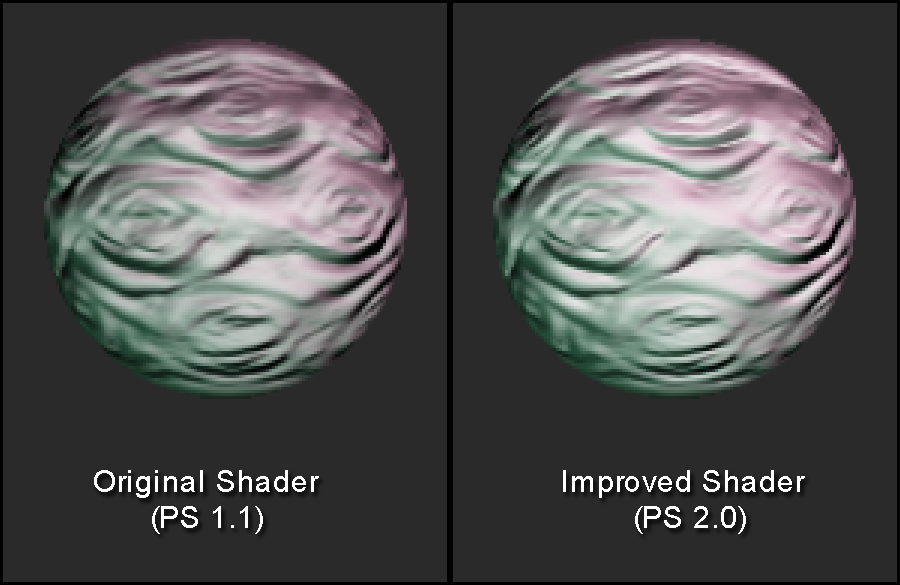
I've written a PS 2.0 shader for normal mapping in DirectX 9. It calculates lighting more accurately, and makes a better-looking image.

Here's an illustration.
Image


Here's a patch containing this shader along with the tangentspace fix that I posted a couple weeks ago:

http://ryanclark.net/irrlicht/BetterNor ... t1.3.1.zip


... and here's a precompiled version for the lazy people! (win32, VisualStudio)
http://ryanclark.net/irrlicht/Irrlicht_ ... mpiled.zip


The original shader is, of course, retained as a fallback for systems without PS 2.0 support.

cheers,

-Ryan Clark
Last edited by RyanClark on Sat Aug 04, 2007 7:33 pm, edited 1 time in total.
RyanClark
Posts: 15
Joined: Sun Jul 22, 2007 7:34 am
Location: Chicago / Austin
Contact:

Post by RyanClark »

If you're curious to see just the new code, click here: http://ryanclark.net/irrlicht/CD3D9Norm ... nderer.cpp

It's basically the same as the 1.1 shader except that all the vectors get normalized at every pixel. This results in brighter and more accurate lighting.
hybrid
Admin
Posts: 14144
Joined: Wed Apr 19, 2006 9:20 pm
Location: Oldenburg(Oldb), Germany
Contact:

Post by hybrid »

Nice. Do you know OpenGL shader languages as well? The normal or parallax mapping there has a problem there, would be nice to get a proper shading with OpenGL as well :wink:
RyanClark
Posts: 15
Joined: Sun Jul 22, 2007 7:34 am
Location: Chicago / Austin
Contact:

Post by RyanClark »

Yeah, I've seen that weirdness in the GL shaders.

I haven't written GL shaders before, but they don't look much different. I'll look and see if I figure them out.

Just to clarify: this new ps2.0 shader is only for materials without parallax. Parallax materials still use the original 1.4 shader.
RyanClark
Posts: 15
Joined: Sun Jul 22, 2007 7:34 am
Location: Chicago / Austin
Contact:

Post by RyanClark »

Oops!

I uploaded the code this morning with a line commented out for debugging!

I just fixed it, so if you've already downloaded the code, please re-download.

sorry about that,

-Ryan
omaremad
Competition winner
Posts: 1027
Joined: Fri Jul 15, 2005 11:30 pm
Location: Cairo,Egypt

Post by omaremad »

remove from vs shader:

Code: Select all

"# normalize light vector 1 \n"\
	"DP3 TempTransLightV1.w, TempTransLightV1, TempTransLightV1; \n"\
	"RSQ TempTransLightV1.w, TempTransLightV1.w; \n"\
	"MUL TempTransLightV1, TempTransLightV1, TempTransLightV1.w;\n"\
	"\n"\
	"# normalize light vector 2 \n"\
	"DP3 TempTransLightV2.w, TempTransLightV2, TempTransLightV2; \n"\
	"RSQ TempTransLightV2.w, TempTransLightV2.w; \n"\
	"MUL TempTransLightV2, TempTransLightV2, TempTransLightV2.w;\n"\
add this in pixel shader before "# calculate color of light1; \n"\

Code: Select all

	"# normalize light vector 1 \n"\
	"DP3 light1Vector.w, light1Vector, light1Vector; \n"\
	"RSQ light1Vector.w, light1Vector.w; \n"\
	"MUL light1Vector, light1Vector, light1Vector.w;\n"\
	"\n"\
	"# normalize light vector 2 \n"\
	"DP3 light2Vector.w, light2Vector, light2Vector; \n"\
	"RSQ light2Vector.w, light2Vector.w; \n"\
	"MUL light2Vector, light2Vector, light2Vector.w;\n"\
thanks Ryan for the previous fix also, found the same bug in lf but didnt notice it in irrlicht. If you have pretty normal mapped stuff rendered in irrlicht please show us, i think i saw you on polycount?
"Irrlicht is obese"

If you want modern rendering techniques learn how to make them or go to the engine next door =p
RyanClark
Posts: 15
Joined: Sun Jul 22, 2007 7:34 am
Location: Chicago / Austin
Contact:

Post by RyanClark »

Sweet, Thanks!

Don't you want to keep those normalizations in the VS, though? Otherwise vertices will have unequal weight when you interpolate between them.

Also, it's important to normalize "normalMapColor" before you use it. Even if the pixels in your normalmap were normalized on disc, texture filtering will denormalize them, so it helps to renormalize them after sampling.

I'm sure you did see me on polycount, btw. What's your handle on there? I haven't finished anything in Irrlicht just yet, but I'll have something cool soon. I will post screenshots as soon as it is ready ;)

Cheers man. Thanks for the gl shader-language assist!

-Ryan
omaremad
Competition winner
Posts: 1027
Joined: Fri Jul 15, 2005 11:30 pm
Location: Cairo,Egypt

Post by omaremad »

Yeah if the diffrence between the light vectors of two interpolated vertices is diffrent it will be unbalanced, forgot about that.
:oops:

The irrlicht shader should like you said normlize the filtered result, which should be ok since there isnt any specular(sometimes the extra normlaize math causes banding).

btw i just saw this when looking over the code, seems irrlicht is moving the light vectors into the positive range before transporting through the tcoords. Which is a waste of operations and will also interfere with the code i posted.
to remove the waste oprations and have per vertex and per pixel and nr txtr normalize use this code inside the vs

remove this from vs

Code: Select all

"MAD OutLightVector1, TempTransLightV1, {0.5,0.5,0.5,0.5}, {0.5,0.5,0.5,0.5}; \n"\
	"MAD OutLightVector2, TempTransLightV2, {0.5,0.5,0.5,0.5}, {0.5,0.5,0.5,0.5}; \n"\*/
and here

Code: Select all

"# normalize light vector 1 \n"\
   "DP3 TempTransLightV1.w, TempTransLightV1, TempTransLightV1; \n"\
   "RSQ TempTransLightV1.w, TempTransLightV1.w; \n"\
   "MUL TempTransLightV1, TempTransLightV1, TempTransLightV1.w;\n"\
   "\n"\
   "# normalize light vector 2 \n"\
   "DP3 TempTransLightV2.w, TempTransLightV2, TempTransLightV2; \n"\
   "RSQ TempTransLightV2.w, TempTransLightV2.w; \n"\
   "MUL TempTransLightV2, TempTransLightV2, TempTransLightV2.w;\n"\ 
do this

Code: Select all

"# normalize light vector 1 \n"\
   "DP3 TempTransLightV1.w, TempTransLightV1, TempTransLightV1; \n"\
   "RSQ TempTransLightV1.w, TempTransLightV1.w; \n"\
   "MUL OutLightVector1 TempTransLightV1, TempTransLightV1.w;\n"\
   "\n"\
   "# normalize light vector 2 \n"\
   "DP3 TempTransLightV2.w, TempTransLightV2, TempTransLightV2; \n"\
   "RSQ TempTransLightV2.w, TempTransLightV2.w; \n"\
   "MUL OutLightVector2, TempTransLightV2, TempTransLightV2.w;\n"\ 
and here is the full ps

Code: Select all

const char OPENGL_NORMAL_MAP_PSH[] = 
	"!!ARBfp1.0\n"\
	"\n"\
	"#Input\n"\
	"ATTRIB inTexCoord = fragment.texcoord[0];   \n"\
	"ATTRIB light1Vector = fragment.texcoord[1]; \n"\
	"ATTRIB light2Vector = fragment.texcoord[2];    \n"\
	"ATTRIB light1Color = fragment.color.primary;   \n"\
	"ATTRIB light2Color = fragment.color.secondary; \n"\
	"\n"\
	"#Output\n"\
	"OUTPUT outColor = result.color;\n"\
	"TEMP temp;\n"\
	"TEMP temp2;\n"\
	"TEMP colorMapColor;\n"\
	"TEMP normalMapColor;\n"\
	"\n"\
	"# fetch color and normal map; \n"\
	"TXP colorMapColor, inTexCoord, texture[0], 2D; \n"\
	"TXP normalMapColor, inTexCoord, texture[1], 2D; \n"\
	"\n"\
	"# calculate color of light1; \n"\
	"MAD normalMapColor, normalMapColor, {2,2,2,2}, {-1,-1,-1,-1}; \n"\
	"DP3 normalMapColor.w, normalMapColor, normalMapColor; \n"\
    "RSQ normalMapColor.w, normalMapColor.w; \n"\
    "MUL normalMapColor, normalMapColor, normalMapColor.w;\n"\ 
	//"MAD temp, light1Vector, {2,2,2,2}, {-1,-1,-1,-1}; \n"\
	"# normalize light vector 1 \n"\
    "DP3 light1Vector.w, light1Vector, light1Vector; \n"\
    "RSQ light1Vector.w, light1Vector.w; \n"\
    "MUL temp, light1Vector, light1Vector.w;\n"\
    "\n"\ 
	"DP3_SAT temp, normalMapColor, temp; \n"\
	"MUL temp, light1Color, temp; \n"\
	"\n"\
	"# calculate color of light2; \n"\
	//"MAD temp2, light2Vector, {2,2,2,2}, {-1,-1,-1,-1}; \n"\
	"# normalize light vector 2 \n"\
    "DP3 light2Vector.w, light2Vector, light2Vector; \n"\
    "RSQ light2Vector.w, light2Vector.w; \n"\
    "MUL temp2, light2Vector, light2Vector.w;\n"\ 
	"DP3_SAT temp2, normalMapColor, light2Vector; \n"\
	"MAD temp, light2Color, temp2, temp; \n"\
	"\n"\
	"# luminance * base color; \n"\
	"MUL outColor, temp, colorMapColor; \n"\
	"MOV outColor.a, light1Color.a; #write interpolated vertex alpha value\n"\
	"\n"\
	"END\n";

this gets rid of uneeded packing and normlizes light vectors and normals
"Irrlicht is obese"

If you want modern rendering techniques learn how to make them or go to the engine next door =p
hybrid
Admin
Posts: 14144
Joined: Wed Apr 19, 2006 9:20 pm
Location: Oldenburg(Oldb), Germany
Contact:

Post by hybrid »

Besides the missing comma in the VS there seems to be another problem in the pixel shader (invalid destination register type). Is it a typo in my code, or in the presented code of the OpenGL shader?
Post Reply