Hello,
Im new to IRRLICHT. I am studying example 7 (collision detection sample), where the program loads a quake 3 level, and added 3 objects (fairies). But I wish to also have collision detection for the fairies.
I tried to addChild fairies to the scene node of the q3 level, but still no collision. Anyone has idea? Thank you very much.
Add collision with objects
I'm afraid you've posted in the wrong forums, this should be in beginners help. Please wait one sec while I wave my magic wand "abra-kadabra!" ... Oh nothing happened... Lets wait for one of the mods to take care of that. 
Back to the issue at hand, if you just want basic box collision for the fairies, you might wanna check out the "createTriangleSelectorFromBoundingBox()" and "createMetaTriangleSelector()" methods inside the scene manager. After you've created the triangle selectors for each of the fairies, you add them (And the OctTreeTriangleSelector for the level mesh) to the "IMetaTriangleSelector", and then use the MetaTriangleSelector for the collision response animators, etc.
The IMetaTriangleSelector is basically a group of triangle selectors, used specifically for these kinds of situations.
Good luck.
Back to the issue at hand, if you just want basic box collision for the fairies, you might wanna check out the "createTriangleSelectorFromBoundingBox()" and "createMetaTriangleSelector()" methods inside the scene manager. After you've created the triangle selectors for each of the fairies, you add them (And the OctTreeTriangleSelector for the level mesh) to the "IMetaTriangleSelector", and then use the MetaTriangleSelector for the collision response animators, etc.
The IMetaTriangleSelector is basically a group of triangle selectors, used specifically for these kinds of situations.
Good luck.
ShadowMapping for Irrlicht!: Get it here
Need help? Come on the IRC!: #irrlicht on irc://irc.freenode.net
Need help? Come on the IRC!: #irrlicht on irc://irc.freenode.net
Thank you Blindside.
Based on your comment, I created a scene::IMetaTriangleSelector. Then I added the triangle selector of the quake level and fairies using addTriangleSelector. It seems to work now with simple testing. This is correct right? I just need simple collision, I think I am happy with this solution if what I did is valid.
Thanks again for your help, appreciate it.
Based on your comment, I created a scene::IMetaTriangleSelector. Then I added the triangle selector of the quake level and fairies using addTriangleSelector. It seems to work now with simple testing. This is correct right? I just need simple collision, I think I am happy with this solution if what I did is valid.
Thanks again for your help, appreciate it.
-
Jgoldnight
- Posts: 31
- Joined: Thu Jun 07, 2007 6:23 pm
- Location: New York
- Contact:
The adding of the triangle selectors to the Metatriangleselector is correct, but hopefully you didn't forget to use that metaselector in setting up the CollisionResponseAnimators for each fairy, as was stated.
Computer scientist by day...
http://www.mrjoelkemp.com
http://www.mrjoelkemp.com
I'd hate to hijack this thread, but I have a problem that is similar to his\hers.
If it needs to be split I apologize...
I am using the free flight code from arras. I loaded in a level model that I have and applied the collision as per Example program 7. Trouble is that when I slide the player ship towards the wall, the camera will stop at the wall, but the player model will continue. Which can be seen, kinda like... in this picture:
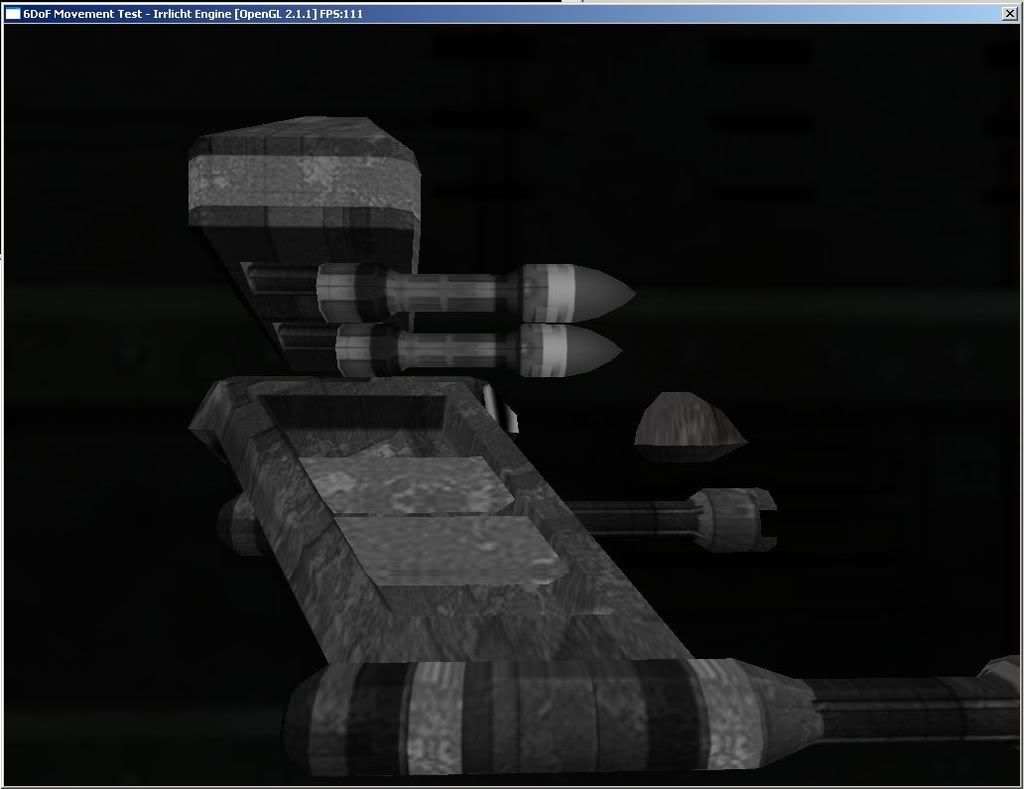
To remedy this issue do I need to apply a TriangleSelector to the ship mesh and stick it into the MetaSeletor as well? or..?
If it needs to be split I apologize...
I am using the free flight code from arras. I loaded in a level model that I have and applied the collision as per Example program 7. Trouble is that when I slide the player ship towards the wall, the camera will stop at the wall, but the player model will continue. Which can be seen, kinda like... in this picture:
To remedy this issue do I need to apply a TriangleSelector to the ship mesh and stick it into the MetaSeletor as well? or..?
The Open Descent Foundation is always looking for programmers! http://www.odf-online.org
"I'll find out if what I deleted was vital here shortly..." -d3jake
"I'll find out if what I deleted was vital here shortly..." -d3jake
Uhh... good idea, though I'm not familiar with how to find when a collision occurs, off to the documentation I go...
The Open Descent Foundation is always looking for programmers! http://www.odf-online.org
"I'll find out if what I deleted was vital here shortly..." -d3jake
"I'll find out if what I deleted was vital here shortly..." -d3jake