[solved] multiply two outputs, 2D + 3D render to texture

You are an experienced programmer and have a problem with the engine, shaders, or advanced effects? Here you'll get answers.
No questions about C++ programming or topics which are answered in the tutorials!
Post Reply
milkshakeman
Posts: 27
Joined: Mon Aug 14, 2006 12:36 pm

[solved] multiply two outputs, 2D + 3D render to texture

Post by milkshakeman »

Hi,

I have the following situation:
- an isometric world, created with draw2DImage, oldskool bitblitting a map together from diamond shaped isometric sprites.
- Every tile has its own 3D shape, all shapes together form a low poly 3D map, which is not rendered but just used for line of fire checking.

Now I want to try something crazy, I know in theory it should work, but I can not find the right way to do it in Irrlicht, if even possible.


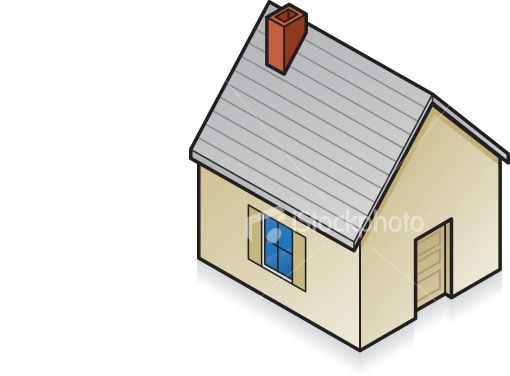
Lets say I have a house in my isometric game, drawn with draw2DImage:
Image

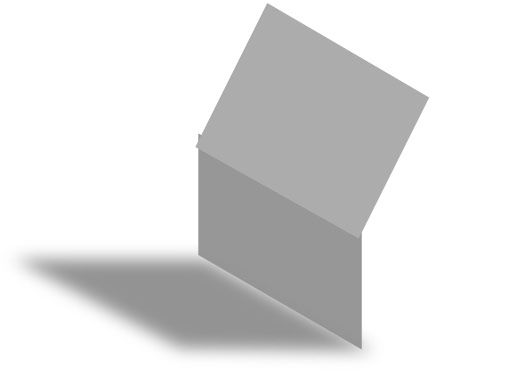
Suppose I put a light in my normally invisible line-of-fire checking 3D world and render it out I may have something like this: (everything is in plain white texture)
Image

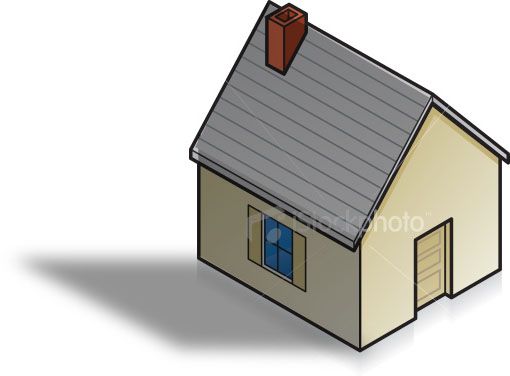
The only thing I would have to do is multiply both outputs to have this endresult:
Image

edit:

I got the idea from here:
http://www.gamedev.net/community/forums ... _id=447054
Last edited by milkshakeman on Mon Aug 30, 2010 11:41 am, edited 3 times in total.
milkshakeman
Posts: 27
Joined: Mon Aug 14, 2006 12:36 pm

Post by milkshakeman »

Allright, I found render draw2DImage to a texture works exactly the same as 3D rendering to texture :) I was making it more complicated than it was I guess...

So now I have them both in a texture, the only trick now is to multiply the two textures... I'm looking into shaders...
Lonesome Ducky
Competition winner
Posts: 1123
Joined: Sun Jun 10, 2007 11:14 pm

Post by Lonesome Ducky »

Yes, shaders are definitely your best bet. You could add a blending mode in the irrlicht driver itself, but you'd have to modify a lot more code than just writing a shader.
milkshakeman
Posts: 27
Joined: Mon Aug 14, 2006 12:36 pm

Post by milkshakeman »

I got it the technique working now, hehe. 8)

So what I do is, create a node, with two materials assigned to two render targets, and the materialtype set to my shader:

Code: Select all

		rt1 = driver->addRenderTargetTexture(core::dimension2d<u32>(256,256), "RTT1");
		rt2 = driver->addRenderTargetTexture(core::dimension2d<u32>(256,256), "RTT2");
		
		test->setMaterialTexture(0, rt1); // set material of node to render target
		test->setMaterialTexture(1, rt2); // set material of node to render target
		test->setMaterialType((video::E_MATERIAL_TYPE)newMaterialType1);
In the drawing loop I set the first rendertarget and draw 2D stuff, then I set the second rendertarget active and draw the 3D stuff,
then I set back to rendertarget 0 and draw the result.

The shader I used is this one:

Code: Select all

sampler2D   tex0: register(s0);
sampler2D   tex1: register(s1);

struct PS_INPUT 
{ 
   float2 TexCoord : TEXCOORD0; 
}; 

float4 pixelMain(PS_INPUT Input) : COLOR0 
{    
   float4 col0 = tex2D(tex0, Input.TexCoord); 
   float4 col1 = tex2D(tex1, Input.TexCoord); 

   float4 final = col0*col1; 

   return final; 
} 
slavik262
Posts: 753
Joined: Sun Nov 22, 2009 9:25 pm
Location: Wisconsin, USA

Post by slavik262 »

If you're just multiplying by a fully white texture, you really don't even need it. You can just sample the other texture.
Lonesome Ducky
Competition winner
Posts: 1123
Joined: Sun Jun 10, 2007 11:14 pm

Post by Lonesome Ducky »

slavik262 wrote:If you're just multiplying by a fully white texture, you really don't even need it. You can just sample the other texture.
I think he's multiplying the house texture with the shadow texture.
milkshakeman
Posts: 27
Joined: Mon Aug 14, 2006 12:36 pm

Post by milkshakeman »

Lonesome Ducky wrote:
slavik262 wrote:If you're just multiplying by a fully white texture, you really don't even need it. You can just sample the other texture.
I think he's multiplying the house texture with the shadow texture.
Yes that is what I'm doing.
So the white parts result in the original colors, and black results in black.
slavik262
Posts: 753
Joined: Sun Nov 22, 2009 9:25 pm
Location: Wisconsin, USA

Post by slavik262 »

I stand corrected. :D

Nicely done.
milkshakeman
Posts: 27
Joined: Mon Aug 14, 2006 12:36 pm

Post by milkshakeman »

And I want to give proper credits to the people that deserve it, because for the concept itself I was inspired by O-san from gamedev.net.
See this thread:
http://www.gamedev.net/community/forums ... _id=447054
Last edited by milkshakeman on Mon Aug 30, 2010 11:40 am, edited 1 time in total.
Mel
Competition winner
Posts: 2293
Joined: Wed May 07, 2008 11:40 am
Location: Granada, Spain

Post by Mel »

You don't even need a shader for that. Use the material type EMT_LIGHTMAP, and it should be the same :)But it is a nice practice to start learning shaders.
"There is nothing truly useless, it always serves as a bad example". Arthur A. Schmitt
Lonesome Ducky
Competition winner
Posts: 1123
Joined: Sun Jun 10, 2007 11:14 pm

Post by Lonesome Ducky »

Mel wrote:You don't even need a shader for that. Use the material type EMT_LIGHTMAP, and it should be the same :)But it is a nice practice to start learning shaders.
That requires a second set of texture coordinates doesn't it? I'm sure it could still work, but the shader will be much more reusable as you won't have to convert vertex types.
hybrid
Admin
Posts: 14143
Joined: Wed Apr 19, 2006 9:20 pm
Location: Oldenburg(Oldb), Germany
Contact:

Post by hybrid »

At least for OpenGL, the first texture coord is used if no second is available but requested. Not sure if I fixed that for d3d as well. But it ought be.
Mel
Competition winner
Posts: 2293
Joined: Wed May 07, 2008 11:40 am
Location: Granada, Spain

Post by Mel »

Yes, it is needed the second set of UV coordinates, i forgot it, at least, in DX it is needed. Well, in any case, it would be easy, you just need to copy the first set into the second. But using the shaders is simpler, indeed.
"There is nothing truly useless, it always serves as a bad example". Arthur A. Schmitt
Post Reply