Gouraud shading is beautiful; it shades according to the angle of the face’s normal. When applied to a sphere, it produces very smooth shadows (even more so if you set the light attenuation to values that give a smooth result)... but when you add shadow volume, everything gets muddled; the smoothness of Gouraud is lost, and it’s practically replaced by triangles that are either completely opaque or completely illuminated... (It’s not that it actually does that, but that’s the visual result in many cases with curved geometry.) However, Gouraud shading on its own cannot produce cast shadows like shadow volume does. I came across several posts attempting to resolve this; I can’t remember the others, but I saved this link:
https://community.khronos.org/t/suppres ... s/36999/10
https://web.archive.org/web/20060614060 ... olumes.txt
By the way, these are the best shaders – combining Gouraud with shadow volume. They’re very cheap. In modern engines, when shadow maps are used, a lot of artefacts and inaccuracies are generated, and it’s very costly to fix them (limiting the shadow distance usually sorts everything out), but Gouraud shading + shadow volume are only superior if both are blended well… Irrlicht on its own can’t do it; you’d probably have to use custom shaders to achieve the best effect.
Posts relating to shadow volumes, but not necessarily relating to combining them with Gouraud shading:
https://dl.acm.org/doi/pdf/10.1145/2070781.2024187
https://inria.hal.science/inria-00390534v1
Shadow volume i'ts good, but destroy the gouraud shading
Shadow volume i'ts good, but destroy the gouraud shading
Irrlicht is love, Irrlicht is life, long live to Irrlicht
Re: Shadow volume i'ts good, but destroy the gouraud shading


This only applies to DirectX 10 or modern OpenGL, as Direct3D 9 does not provide sufficient support to generate this type of shadow volume with shaders... (you could try to approximate it anyway with CPU, but it ends up being quite resource-intensive all the same)
https://www.cnblogs.com/liangliangh/p/4165228.html
What could be achieved with shaders is to organise the calculations, leaving Gouraud shading until last as the final pass after shadow volume… I’m not entirely sure about this; I’m still thinking about how to go about it, but here’s an interesting post:
https://gamedev.net/tutorials/programmi ... 3d-9-r2019
"Volume generation: calculates and stores the shadow geometry on the CPU. It mentions vertex shaders as a possible alternative optimisation for extruding volumes on the GPU, but states that it does not use them in its example.
Stencil: uses D3DRS_STENCILPASS, increment/decrement operations and D3D9’s two-sided stencil mode.
Gouraud shading: the scene geometry is re-rendered with Direct3D lighting enabled; the stencil prevents light contributions from accumulating in shaded regions."
That’s what ChatGPT told me, but I don’t believe it, because, as I see it, regardless of the order, if you calculate it based on whether it’s shaded or not, it will always fail, as shadow volume only tracks 1 or 0 – that is, light or shadow – and if the internal Gouraud shading were to illuminate it, it would be ignored because it’s being shaded by the shadow volume… I don’t know, maybe I’m being daft and the solution is in the post and I just can’t see it((edit: yes, there is a sort of mix – I didn’t look properly – although the result is almost identical to that of Irrlicht))
Edit: I can see the problem now, in fact, Irrlicht was already doing it correctly; I mean, I was focusing a lot on Irrlicht’s ‘SpecialFX’ example, but I never used an example of my own. By adjusting the light attenuation, you can clearly see Gouraud shading blended well with shadow volume. I thought the problem was shadow volume, but in reality it was that the light attenuation values were set so that the triangles were shaded very abruptly rather than smoothly…
(irrlicht example:)
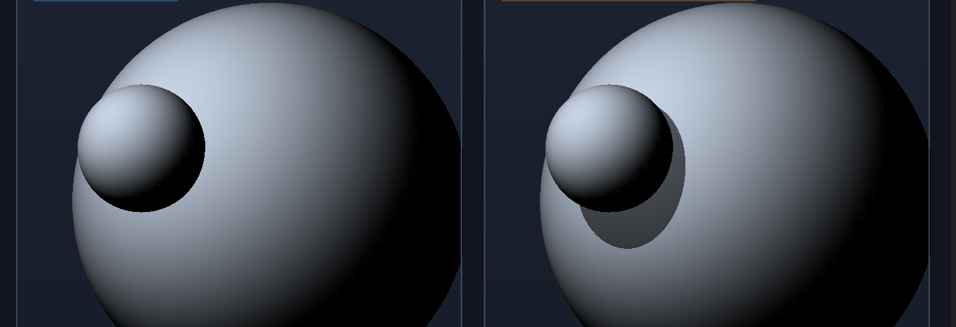
Irrlicht is love, Irrlicht is life, long live to Irrlicht
Re: Shadow volume i'ts good, but destroy the gouraud shading
Glad you found it
IRC: #irrlicht on irc.libera.chat
Code snippet repository: https://github.com/mzeilfelder/irr-playground-micha
Free racer made with Irrlicht: http://www.irrgheist.com/hcraftsource.htm
Code snippet repository: https://github.com/mzeilfelder/irr-playground-micha
Free racer made with Irrlicht: http://www.irrgheist.com/hcraftsource.htm
Re: Shadow volume i'ts good, but destroy the gouraud shading
Code: Select all
// Irrlicht 1.8.x: two spheres, one point light, default stencil-shadow color.
// Press S to toggle the shadow volume on/off and compare the surface shading.
// Build on Windows with Irrlicht 1.8.x and the Direct3D 9 driver available.
//
// SCALE keeps the scene's relative distances/proportions (equivalent geometry).
// LIGHT_PULL moves the light closer to the spheres (toward their centroid)
// without moving or rescaling the spheres.

#include <irrlicht.h>

using namespace irr;

class ShadowToggleReceiver : public IEventReceiver
{
public:
    ShadowToggleReceiver() : Shadow(0), Enabled(true) {}

    void attach(scene::IShadowVolumeSceneNode* shadow)
    {
        Shadow = shadow;
        if (Shadow)
            Shadow->setVisible(Enabled);
    }

    bool OnEvent(const SEvent& event) override
    {
        if (event.EventType == EET_KEY_INPUT_EVENT &&
            event.KeyInput.Key == KEY_KEY_S &&
            !event.KeyInput.PressedDown)
        {
            if (Shadow)
            {
                Enabled = !Enabled;
                Shadow->setVisible(Enabled);
            }
            return true;
        }
        return false;
    }

private:
    scene::IShadowVolumeSceneNode* Shadow;
    bool Enabled;
};

int main()
{
    ShadowToggleReceiver eventReceiver;

    // Uniform scale factor: < 1 brings everything closer and smaller,
    // preserving all relative distances and proportions.
    const f32 SCALE = 0.5f;

    // How much of the original light-to-centroid distance to keep.
    // 1.0 = original light position, 0.0 = light at the centroid.
    // Smaller values pull the light closer to the spheres.
    const f32 LIGHT_PULL = 0.35f;

    // The stencilbuffer parameter must be true for stencil shadows.
    IrrlichtDevice* device = createDevice(
        video::EDT_OPENGL,
        core::dimension2d<u32>(1280, 720),
        32,
        false,   // windowed
        true,    // stencil buffer enabled
        false,   // vsync
        &eventReceiver);

    if (!device)
        return 1;

    video::IVideoDriver* driver = device->getVideoDriver();
    scene::ISceneManager* smgr = device->getSceneManager();

    // Sphere placement (scaled uniformly to keep proportions).
    const core::vector3df receiverPos = core::vector3df(5.0f, 35.0f, 0.0f) * SCALE;
    const core::vector3df casterPos   = core::vector3df(-16.5f, 44.0f, 30.0f) * SCALE;
    const f32 receiverRadius = 34.0f * SCALE;
    const f32 casterRadius   = 11.0f * SCALE;

    // Centroid of the two spheres, used as the anchor for pulling the light in.
    const core::vector3df centroid = (receiverPos + casterPos) * 0.5f;

    // Original (scaled) light position, then pulled toward the centroid.
    const core::vector3df lightBase = core::vector3df(-91.0f, 128.0f, 132.0f) * SCALE;
    const core::vector3df lightPos  = centroid + (lightBase - centroid) * LIGHT_PULL;

    // Light radius scaled by SCALE and by how much we pulled it in,
    // so the falloff volume still covers the spheres.
    const f32 lightRadius = 600.0f * SCALE * LIGHT_PULL;

    // One point light, now closer to the spheres.
    scene::ILightSceneNode* light = smgr->addLightSceneNode(
        0,
        lightPos,
        video::SColorf(4.0f, 4.0f, 4.0f),
        lightRadius);

    if (!light)
    {
        device->drop();
        return 3;
    }

    // Attenuation: (constant, linear, quadratic).
    // Rescaled by SCALE to keep perceived falloff equivalent to the original
    // scene; since the light is also pulled closer, this yields a brighter
    // near-field. Increase linear/quadratic if the scene looks blown out.
    video::SLight& lightData = light->getLightData();
    lightData.Attenuation = core::vector3df(
        1.0f,
        0.07f / SCALE,
        0.01f / (SCALE * SCALE));

    // Large sphere: shadow receiver.
    scene::IMeshSceneNode* receiver = smgr->addSphereSceneNode(
        receiverRadius, 64, 0, -1, receiverPos);

    // Small sphere: shadow caster. Same default material as the receiver.
    scene::IMeshSceneNode* caster = smgr->addSphereSceneNode(
        casterRadius, 48, 0, -1, casterPos);

    if (!receiver || !caster)
    {
        device->drop();
        return 2;
    }

    // z-fail is the default (true); leave the volume settings unchanged.
    scene::IShadowVolumeSceneNode* shadow = caster->addShadowVolumeSceneNode();
    eventReceiver.attach(shadow);

    // Use the engine's default shadow color: SColor(150, 0, 0, 0).
    smgr->setShadowColor();

    scene::ICameraSceneNode* camera = smgr->addCameraSceneNodeFPS(0, 100.0f, 0.08f);
    camera->setFOV(53.13f*core::DEGTORAD);
    device->setWindowCaption(
        L"Irrlicht - two spheres + stencil shadow volume (press S to toggle)");

    while (device->run())
    {
        if (device->isWindowActive())
        {
            driver->beginScene(
                true, true, video::SColor(255, 24, 29, 41));
            smgr->drawAll();
            driver->endScene();
        }
        else
        {
            device->yield();
        }
    }

    device->drop();
    return 0;
}
The problem only occurs when the light somehow disrupts the smooth transition of the Gouraud shading relative to its normals; it’s a bit odd. Basically, you need to find the right lighting pattern, depending on the size (yes, I don’t understand why the object’s size matters either; perhaps normalising the normals will sort it out, though I haven’t confirmed anything yet).
For now, I’m pleased to know that, first and foremost, Irrlicht compiles almost everything into perfect SSE without needing to add anything (my goodness, that means Irrlicht’s code is highly optimised to be auto-vectorised by GCC); the only thing the compiler couldn’t optimise were loops related to something like curly brackets or something like that (I didn’t understand a thing – I didn’t know Irrlicht had anything like that, and I don’t think I’ll be using it, perhaps it was the password for .zip files or something like that?)... …and secondly, shadow volumes are perfect under these conditions; they’re the equivalent of having a 4k or even 8k shadow map, whilst using very few resources in comparison…
The problem reoccurs if I change `video::SColorf(4.0f, 4.0f, 4.0f)` to something like `video::SColorf(30.0f, 30.0f, 30.0f)`, or if I change the attenuation or the size of the object; the variations are the same... The light must not exceed a certain luminance threshold relative to the object in order to display the correct result
Irrlicht is love, Irrlicht is life, long live to Irrlicht
Re: Shadow volume i'ts good, but destroy the gouraud shading
Phew, I remember there was a previous discussion about shadows. There is some distance based clipping going on that at some point objects too far away from light no longer throw shadows. Also being between light source and object can (maybe depending on platform...) be a bit tricky.
IRC: #irrlicht on irc.libera.chat
Code snippet repository: https://github.com/mzeilfelder/irr-playground-micha
Free racer made with Irrlicht: http://www.irrgheist.com/hcraftsource.htm
Code snippet repository: https://github.com/mzeilfelder/irr-playground-micha
Free racer made with Irrlicht: http://www.irrgheist.com/hcraftsource.htm