OpenGL and Direct3D9 rendering different :(

You discovered a bug in the engine, and you are sure that it is not a problem of your code? Just post it in here. Please read the bug posting guidelines first.
Post Reply
greenya
Posts: 1012
Joined: Sun Jan 21, 2007 1:46 pm
Location: Ukraine
Contact:

OpenGL and Direct3D9 rendering different :(

Post by greenya »

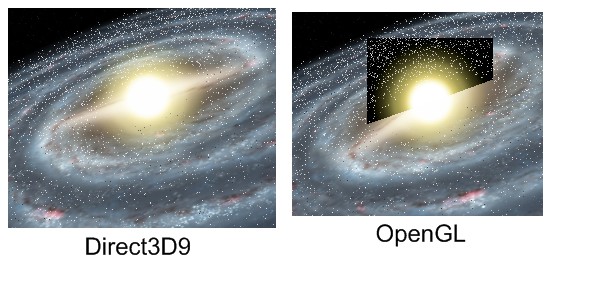
I used totally identical scene and all the settings. Only renderer different. Look at screen shot:
Image

there is:
1) plane (2 triangles actually); material type is EMT_TRANSPARENT_ADD_COLOR; with EMF_LIGHTING off; (+ EDS_BBOX)
2) sphere; it is EMT_LIGHTMAP with EMF_LIGHTING off;
3) billboard; EMT_TRANSPARENT_ADD_COLOR with EMF_LIGHTING off; (actually you see problem-edges);

Does any body know how to fix it ?
linkoraclehero
Posts: 81
Joined: Sat Sep 09, 2006 6:46 am

Post by linkoraclehero »

It's most likely a video card based problem, I believe nVidia works on making DirectX run better, while ATI tries to make OpenGL run better. I'd try it on another computer first, and if it still does it, it's the code. Personally, I'd have to see it in motion to see what's going on. I'd also try D3D8 too, compare it to D3D9. But my only guess would be that the glow is blending with the Z-Buffer only in OpenGL. Try rendering billboards out of the Z-Buffer. Only problem is, in distance, it would ALWAYS be on top.
greenya
Posts: 1012
Joined: Sun Jan 21, 2007 1:46 pm
Location: Ukraine
Contact:

Post by greenya »

That was not most "interesting" rendering.
Please take a look on the next one:

Image

Again, it was renderer with totally the same config. More, it was renderer with the same result on 2 different video cards: Radeon X200 and GeForce 7600GS.

Any suggestions?

P.S.
linkoraclehero wrote:Try rendering billboards out of the Z-Buffer. Only problem is, in distance, it would ALWAYS be on top.
How to try this?
linkoraclehero
Posts: 81
Joined: Sat Sep 09, 2006 6:46 am

Post by linkoraclehero »

One way would be to do handle the drawings yourself using a for-loop (instead of drawAll), drawing everything but the billboards, THEN the billboards. But like I said, it'll show through all solid objects. But you can look into irr::video::SMaterial::ZWriteEnable, in the irr docs.
linkoraclehero
Posts: 81
Joined: Sat Sep 09, 2006 6:46 am

Post by linkoraclehero »

P.S.: Love the planet renders, really good job.
hybrid
Admin
Posts: 14143
Joined: Wed Apr 19, 2006 9:20 pm
Location: Oldenburg(Oldb), Germany
Contact:

Post by hybrid »

Well, this is a bug in the OpenGL renderer which is also visible in the examples (billboards attached to light nodes). Try to disable zwrite in the material when drawing the sun.
greenya
Posts: 1012
Joined: Sun Jan 21, 2007 1:46 pm
Location: Ukraine
Contact:

Post by greenya »

linkoraclehero wrote:But you can look into irr::video::SMaterial::ZWriteEnable, in the irr docs.
Thank You. That helps.
Post Reply