What's a good way of doing a blur shader, quickly? The method that i use is quite slow and drops my framerate from 60 to 30 (with vsync on). Obviously this is quite bad if i want to use the blurring a lot.
The way i do it currently is just rendering the scene to a frame buffer object and then passing the texture to a pixel shader which takes the surrounding few pixels and averages them to get the pixel colour. I can only really sample the 4 neighbouring pixels (N, E, S, W) if i want to get any suitable performance out of it.
Any better methods?
I saw in a video for the new Turok game that when you get hit your vision blurs really nicely and heavily but i can't imagine how they'd manage to do that effect whilst keeping a decent framerate.
Blur shaders
the method you should blur with should depend on the strength of the shader model of the gpu you are using, pre sm3 cards are really slow at indirect tex reads, i guess you are using them?.
If you calculate the offsetted tcoords in your vertex shader its like a normal tex read and hence allot faster. Show me the code and ill help out, btw my method limits the number of samples to the number of interpolators at your disposal (8 is enough for good guassian).
If you calculate the offsetted tcoords in your vertex shader its like a normal tex read and hence allot faster. Show me the code and ill help out, btw my method limits the number of samples to the number of interpolators at your disposal (8 is enough for good guassian).
"Irrlicht is obese"
If you want modern rendering techniques learn how to make them or go to the engine next door =p
If you want modern rendering techniques learn how to make them or go to the engine next door =p
-
TheGameMaker
- Posts: 275
- Joined: Fri May 12, 2006 6:37 pm
- Location: Germany
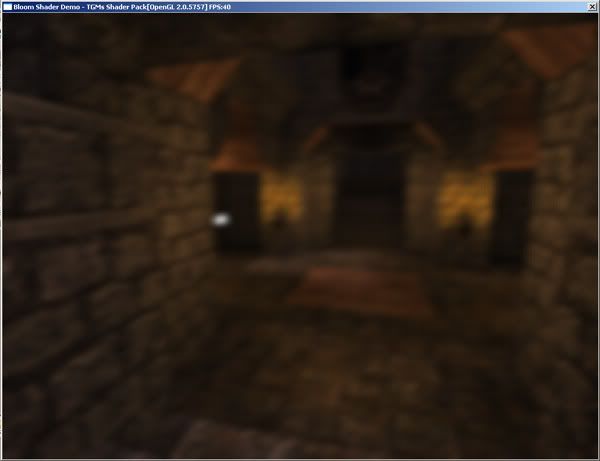
That blur looks really nice, i do get banding on mine, though i wasn't too bothered about that as i thought it kinda added to the overall effect i was going for. I'm actually using this shader on PS3, so erm.. whatever power that has is what i have to work with 
Only been doing shaders for a few months so i dont know all the tricks of optimising them apart from general program optimisation tricks. Also CG is the shading language.
This is merely a pixel shader on its own, no vertex shader but obviously i can write one if there's tricks to be used there as you say.
Only been doing shaders for a few months so i dont know all the tricks of optimising them apart from general program optimisation tricks. Also CG is the shading language.
Code: Select all
float4 main (float2 texCoord : TEXCOORD0,
		  uniform sampler2D texture) : COLOR
{
  float4 colour = tex2D(texture, float2(texCoord[0], texCoord[1]));
  colour += tex2D(texture, float2(texCoord[0]-0.005, texCoord[1]));
  colour += tex2D(texture, float2(texCoord[0]+0.005, texCoord[1]));
  colour += tex2D(texture, float2(texCoord[0], texCoord[1]-0.005));
  colour += tex2D(texture, float2(texCoord[0], texCoord[1]+0.005));
  colour /= 5.0;

  return colour;
}


Basically instead of doing +0.005 inside the pixel shader, calculate this value in the vertex, then use a seperate texcoord from the vertex for each of these texture reads. According to omaremad this should be much faster.
Alternatively you could try a DOF method but im not sure what they use for that, infact I think its a 5x5 sampling grid usually anyway so same thing...
Damn is reading from neighbouring pixels the only way to blur?...
You could try something like several RTT, and then sticking them on top of each other with seperate alpha values, no shaders needed...
Alternatively you could try a DOF method but im not sure what they use for that, infact I think its a 5x5 sampling grid usually anyway so same thing...
Damn is reading from neighbouring pixels the only way to blur?...
You could try something like several RTT, and then sticking them on top of each other with seperate alpha values, no shaders needed...
ShadowMapping for Irrlicht!: Get it here
Need help? Come on the IRC!: #irrlicht on irc://irc.freenode.net
Need help? Come on the IRC!: #irrlicht on irc://irc.freenode.net
Maybe the banding is due to the 0.005? the tex coord should refer to exactly on pixel to let right up down, the value of tcoord you add is 1/screenrez
float(1/screenx,1/scrreny)
As for layering rtt's thats old bloom and utilises alpha blending, not sure if that would be any faster on something shader capable as the ps3, take care though the ps3 doesnt have load balancing like the xbox 360 so make sure you balance the complexity of vertex and pixel shaders otherwise a busy pixel core can cause slow performance while your vertex cores are sleeping.
I also know that the ps3 has sevral embedded rams on the gpu and general ram that can be used for textures, make sure you put heavily refrenced heavily updated things (like the rtt's) in the ebedded ram while other textures in slower rams. You can also use lower resolution rendertargets for bilinear filtering to help (pow2 though).
float(1/screenx,1/scrreny)
As for layering rtt's thats old bloom and utilises alpha blending, not sure if that would be any faster on something shader capable as the ps3, take care though the ps3 doesnt have load balancing like the xbox 360 so make sure you balance the complexity of vertex and pixel shaders otherwise a busy pixel core can cause slow performance while your vertex cores are sleeping.
I also know that the ps3 has sevral embedded rams on the gpu and general ram that can be used for textures, make sure you put heavily refrenced heavily updated things (like the rtt's) in the ebedded ram while other textures in slower rams. You can also use lower resolution rendertargets for bilinear filtering to help (pow2 though).
"Irrlicht is obese"
If you want modern rendering techniques learn how to make them or go to the engine next door =p
If you want modern rendering techniques learn how to make them or go to the engine next door =p