Atmospheric light scattering shader... 4 use with ATMOsphere

Post those lines of code you feel like sharing or find what you require for your project here; or simply use them as tutorials.
devsh
Competition winner
Posts: 2049
Joined: Tue Dec 09, 2008 6:00 pm
Location: UK
Contact:

Atmospheric light scattering shader... 4 use with ATMOsphere

Post by devsh »

Dear Irrlichters,

I have swapped engines due to irrlicht's poor parallel performance, things were being held back by the CPU etc etc. causing a drop in FPS which was unnacceptable. Therefore I didnt produce any code for irrlicht (I have but a quick hack over ATMOsphere, unsuitable for redistribution because of code cleaness and performance).

This is per-pixel, and not per vertex unlike nvidia's and Ogre3D's SkyX. Therefore better :)
so you can take 3 samples for it to look good (I prefer 8)

Image
The thing is first rendered to a texture, then texture wrapped on a hemi-sphere, this is LatLong wrapping but I will work on getting the thing in Peirce Quincuncial Projection so area is preserved (there is oversampling at the top and undersampling on the rim of the hemi-sphere)

So you will have to C++ this code for yourself

However I have not left you on your own, in the shader comments there are recomended values for uniform values.

I would also build on top of "ATMOsphere by pazystamo" to get the sun vector... normalize(AbsolutecameraPos-AbsolutesunPos)

Of course you will need to get rid of ATMOsphere's billboard sun...

Shaders:
std.vert

Code: Select all

varying vec3 normal;

void main()
{
        gl_Position = gl_ModelViewProjectionMatrix *gl_Vertex;
	gl_FrontColor = gl_Color;

	gl_TexCoord[0] = gl_MultiTexCoord0;
        normal = gl_Normal;
}
Scatter.frag
this shader tricks a screenQuad into "thinking" its a sphere and performs scattering

Code: Select all

// Could not be defines because they get altered

float Mie = 0.0005;
float Ray = 0.0025;

// time' contains seconds since the program was linked.

uniform float g,gSQ,altitudeMetres,atmoAltInKm,sunIntensity,Exposure;
// -0.921, g^2, x<250, 120, 50, 1.6 == reccomended values
uniform int nSamples; // 8<x<24
uniform vec3 WaveLen, sun; // (x,y,z), (0.57,0.54,0.44)
uniform sampler2D stars;

#define innerR 9.82751
#define outerR 10.2963
#define IOscale 0.46879
float scaledDepth;

float F(float cosD) {
	return 0.75*cosD*cosD+0.75;
}

float FMie(float cosD) {
	return ((3.0*(1.0-gSQ))/(2.0*(2.0+gSQ)))*((1.0+cosD*cosD)/pow(1.0+gSQ-2.0*g*cosD,1.5));
}

float scale(float cosd)
{
	float x = 1.0 - cosd;
	return scaledDepth * exp(-0.00287 + x*(0.459 + x*(3.83 + x*(-6.80 + x*5.25))));
}

void main()
{
	// == Dome from UV reconstr
	vec3 norm;
	norm.y = cos(gl_TexCoord[0].y*1.570796);
	norm.x = cos(6.283184*gl_TexCoord[0].x);
	norm.z = sin(6.283184*gl_TexCoord[0].x);
	norm.xz *= sqrt(1.0-norm.y*norm.y);

	// == Begin Scattering
	vec3 sunDir = normalize(sun);
	float sunToStar = 1.0+min(0.1+sunDir.y/max(abs(sunDir.x),max(abs(sunDir.y),abs(sunDir.z))),0.0);
	float Ho = 1.0-pow(max(sunDir.y,0.0),0.5)*0.8;
	Mie += pow(1.0-abs(sunDir.y),3.0)*0.006;
	Ray += pow(1.0-abs(sunDir.y),1.25)*0.003;
    scaledDepth = IOscale*Ho;
	float IOscaleSQHo = pow(IOscale,2.0)*Ho;


	float cameraH = (IOscale/atmoAltInKm)*altitudeMetres/1000.0;
	float fDepth = exp(-cameraH/IOscaleSQHo);
	vec3 vRay = norm;
	vRay.y -= cameraH;
	float fFar = length(vRay);
	vRay /= fFar;
	vec3 vStart = vec3(0.0,cameraH,0.0);
	float fStartOffset = fDepth * scale(vRay.y);
	
	float fSampleLen = fFar/float(nSamples);
	float fScaledLen = fSampleLen/IOscale;
	vec3 vSampleRay = vRay*fSampleLen;
	vec3 vSamplePoint = vStart+vSampleRay*0.5;

	vec3 invPwrRayWave = 1.0/pow(WaveLen,4.0)*Ray;
	vec3 invPwrMieWave = 1.0/pow(WaveLen,0.84)*Mie;
	vec3 loopWave = invPwrMieWave*12.56637+invPwrRayWave*12.56637;

	// ray tracing :)
	vec3 color;
	for (int i = 0; i < nSamples; i++)
	{
		float fHeight = length(vSamplePoint);
		fDepth = exp(-fHeight/IOscaleSQHo);
		
		float fLightAngle = 0.45+0.55*dot(sunDir, vSamplePoint) / fHeight;
		float fCameraAngle = 0.45+0.55*dot(vRay, vSamplePoint) / fHeight;
		
		float fScatter = fStartOffset + fDepth*(scale(fLightAngle) - scale(fCameraAngle));
		vec3 vAttenuate = exp(-fScatter*loopWave );
		
		// Accumulate color
		color.xyz += vAttenuate*(fDepth * fScaledLen);
		
		// Next sample point
		vSamplePoint += vSampleRay;
	}

    vec3 RayleighColor = color*invPwrRayWave;
    vec3 MieColor      = color*invPwrMieWave;

	float cosd = dot(normalize(vec3(0.0,cameraH,0.0)-norm),sunDir);
	vec4 final = vec4(1.0-exp(-(Exposure)*(FMie(cosd)*MieColor+F(cosd)*RayleighColor)*sunIntensity*(1.0+pow(max(sunDir.y*1.25,0.0),4.0))),1.0)*pow(sunToStar,6.0);

	//Stolen from SkyX
	float nightmult = saturate(1 - max(final.x, max(final.y, final.z))*64);
	final.xyz += nightmult *(vec3(0.02, 0.02, 0.04)*(2.0-0.75*saturate(-sunDir.y))*pow(1.0-norm.y,3.0) + texture2D(stars,normalize(vec3(norm.x,norm.y*0.85+0.15,norm.z)).xz).xyz*(0.35 + saturate(-sunDir.y*0.45)));

	gl_FragColor = final;
}
LookUp.frag

Code: Select all

// simple fragment shader

// 'time' contains seconds since the program was linked.
uniform sampler2D tex;

varying vec3 normal;

void main()
{
	vec3 norm = normalize(normal);
	vec2 normXZ = normalize(norm.xz);
	float rX = (norm.z<0.0 ? (6.283183-acos(normXZ.x)):acos(normXZ.x))/6.283183;
	float rY = acos(norm.y)/1.570796;
	vec2 TC =  vec2(rX,rY);
	gl_FragColor = texture2D(tex,clamp(TC,0.005,0.996));
	if (norm.y<0.0) gl_FragColor = 0.0;
}
Ok here is the performance friendly implementation:

1) make a ScreenQuad (like xEffects)
2) make a shader material for that quad using the Scatter.frag and std.vert shader
3) make two Render Targets (if you are a cheapscape 512x512 will do, but I advise >=1024X1024)
4) have a function called updateTexture() which is invoked each frame
now In this function you need to update the first renderTarget, render
into it using the quad with the Scatter shader
HOWEVER THERE IS AN IMPORTANT BUT:
If you try to update a 1024*1024 texture in one go your FPS is guaranteed to drop by loads. So here is a simple trick, split the screen into n^2 cells (i.e. 64). Then each updateTexture() function call, you set the view port to a particular cell and render that fraction of the screenQuad, then move along one cell. If you had split the texture into 64 cells and had 60 FPS then the texture would be updated within 1.5 seconds. Now when you completed with updating all the cells (64 out of 64 done) you copy the texture into the second Render Target we made earlier, then start the process again. You needed that second RTT to only see the finished result, and not see the half the cells upgraded and half not. Because the sun is moving slowly (if I remember right ATMOsphere updates the sun position every 15 virtual mins) you will not notice any lags.
5) every frame draw a skydome with the LookUp.frag shader&&material !!IT MUST HAVE BILINEAR FILTERING!! (trilinear and anisotropic are even better)

If you implement according to the above, even a shitty-just-support-shader-model-2.0 5800 geforce mobile laptop chipset should get 60 fps

P.S. I am really sorry that it sounds like a speech, and that i presented irrlicht in a bad light
devsh
Competition winner
Posts: 2049
Joined: Tue Dec 09, 2008 6:00 pm
Location: UK
Contact:

Post by devsh »

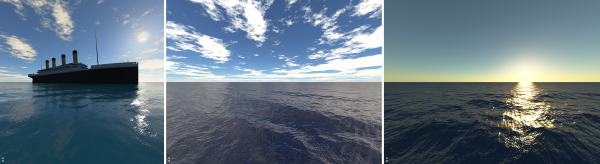
Of course you can reuse the sky texture for different uses.

cheap object reflections (would be useful for the VeeDub guy)
Image

non uniform ambient
Image

Cheap water rendering
Image
Last edited by devsh on Mon May 10, 2010 7:22 pm, edited 3 times in total.
ACE247
Posts: 704
Joined: Tue Mar 16, 2010 12:31 am

Post by ACE247 »

So you switched Engines. :(
What happened to "I'm on a mission to make irrlicht next gen... and I dont have time to play with D3D" :?:
But nice shader :!: I will see how I can use this. :)
Last edited by ACE247 on Mon May 10, 2010 6:01 pm, edited 1 time in total.
Bate
Posts: 364
Joined: Sun Nov 01, 2009 11:39 pm
Location: Germany

Post by Bate »

That looks awesome, too bad it's not HLSL.
Never take advice from someone who likes to give advice, so take my advice and don't take it.
ACE247
Posts: 704
Joined: Tue Mar 16, 2010 12:31 am

Post by ACE247 »

Yeah I'd love to have this in HLSL.
Unfortunately i dont have a clue about GL so anyone that would convert this will make me very happy. :D
devsh
Competition winner
Posts: 2049
Joined: Tue Dec 09, 2008 6:00 pm
Location: UK
Contact:

Post by devsh »

converting to HLSL is too easy

get a tutorial and find out the equivalents for the gl_ variables
ACE247
Posts: 704
Joined: Tue Mar 16, 2010 12:31 am

Post by ACE247 »

Will try, It'll probably do me good anyhow. Any special links for good GL Tut's welcome.
PS: were did you get that titanic model? It looks awesome!
slavik262
Posts: 753
Joined: Sun Nov 22, 2009 9:25 pm
Location: Wisconsin, USA

Post by slavik262 »

Out of curiosity, what engine have you switched to?

Also, can we see your water rendering shader? That's one of the prettiest water surfaces I've ever seen.
shadowslair
Posts: 758
Joined: Mon Mar 31, 2008 3:32 pm
Location: Bulgaria

Post by shadowslair »

Lol! Devsh, can you please post image links/thumbnails only? And looks like SF doesn`t resize the avatars automatically, but it would be very nice of you to crop

your avatar a little bit. Yeah, we spend many hours staring at the screen, but luckily we`re still able to see things. BTW, I have seen these images- Virion had

already posted a link at: http://irrlicht.sourceforge.net/phpBB2/ ... hp?t=38262 ( http://www-evasion.imag.fr/Membres/Eric.Bruneton/ )
:)
Last edited by shadowslair on Mon May 10, 2010 6:40 pm, edited 2 times in total.
"Although we walk on the ground and step in the mud... our dreams and endeavors reach the immense skies..."
Bate
Posts: 364
Joined: Sun Nov 01, 2009 11:39 pm
Location: Germany

Post by Bate »

slavik262 wrote:Out of curiosity, what engine have you switched to?

Also, can we see your water rendering shader? That's one of the prettiest water surfaces I've ever seen.
Hehe, indeed. I was afraid of asking myself :)
Never take advice from someone who likes to give advice, so take my advice and don't take it.
ACE247
Posts: 704
Joined: Tue Mar 16, 2010 12:31 am

Post by ACE247 »

Seems like devsh just copied those pic's. Image
http://www-evasion.imag.fr/Membres/Eric ... /ocean.png
But obviously they were just for demonstration. 8)
devsh
Competition winner
Posts: 2049
Joined: Tue Dec 09, 2008 6:00 pm
Location: UK
Contact:

Post by devsh »

yeh they are the only ones I did not render myself, due to to sheer effort required to implement Bidirectional Reflectance Distribution Function, this is what makes the surface look so nice. But you can see it is only that and the reflection of the skydome*fresnel term which give the surface its colour.

Now it is time for volumetric clouds, http://www.gamedev.net/columns/hardcore/cloudrendering/ from that I will progress onto the better looking method by the guy who did the water
Grz-
Posts: 62
Joined: Wed Dec 26, 2007 1:06 pm

Post by Grz- »

I finally got it working with a few tweaks but it fail to apply the texture correctly on the skydome and the sun is missing (with tweaks i can have either the sun or the 'gradient' but not both at the same time), only a small portion of the skydome is covered and the star texture is not shown too... if someone could help out...

Here is what i have so far:

Image

shader parameters:

Code: Select all

            irr::f32 TexVar = -0.991f;
            services->setPixelShaderConstant("g", &TexVar, 1);

            TexVar = -0.982f;
            services->setPixelShaderConstant("gSQ", &TexVar, 1);

            TexVar = 10.0f;
            services->setPixelShaderConstant("altitudeMetres", &TexVar, 1);

            TexVar = 120.0f;
            services->setPixelShaderConstant("atmoAltInKm", &TexVar, 1);

            TexVar = 50.0f;
            services->setPixelShaderConstant("sunIntensity", &TexVar, 1);

            TexVar = 2.0f;
            services->setPixelShaderConstant("Exposure", &TexVar, 1);

            irr::u32 TexVar2 = 8;
            services->setPixelShaderConstant("nSamples", (irr::f32*)(&TexVar2), 1);

core::vector3df pos = core::vector3df(core::vector3df(1/pow(0.650f, 4.0f),1/pow(0.570f, 4.0f),1/pow(0.475f, 4.0f)));

services->setPixelShaderConstant ( "WaveLen" , reinterpret_cast<f32*>( &pos ) , 3 );

core::vector3df np = core::vector3df(0.57,0.54,0.44);
services->setPixelShaderConstant ( "sun" , reinterpret_cast<f32*>( &np ) , 3 );


			irr::u32 TexVar3 = 1;
			services->setPixelShaderConstant("stars", (irr::f32*)(&TexVar3), 1);
            TexVar3 = 0;
			services->setPixelShaderConstant("tex", (irr::f32*)(&TexVar3), 1);
Applied using this code:

Code: Select all

    s32 matScattering = loadShaders("data/shaders/std.vert", "data/shaders/scatter.frag");
    s32 matLookUp = loadShaders("data/shaders/std.vert", "data/shaders/lookup.frag");

    CScreenQuad *screenQuad = new CScreenQuad(smgr->getRootSceneNode(),smgr,10);
     screenQuad->getMaterial(0).MaterialType = (video::E_MATERIAL_TYPE)matScattering ;

	driver->setTextureCreationFlag(video::ETCF_CREATE_MIP_MAPS, false);
	driver->setTextureCreationFlag(video::ETCF_ALWAYS_32_BIT, true);

    video::ITexture* rt = driver->addRenderTargetTexture(core::dimension2d<u32>(1024,1024), "RTT1", video::ECF_A8R8G8B8);

    driver->beginScene(true, true, 0);
    driver->setRenderTarget(rt, true, true, video::SColor(255,255,255,255));
    screenQuad->render();
    driver->setRenderTarget(0, true, true, 0);
    driver->endScene();

    scene::ISceneNode *skyDome = smgr->addSkyDomeSceneNode(rt,32,16,1.0f,2.0f);
    skyDome->setMaterialFlag ( video::EMF_LIGHTING , false );
    skyDome->setMaterialFlag(video::EMF_BILINEAR_FILTER, true);
    skyDome->setMaterialFlag(video::EMF_ANISOTROPIC_FILTER, true);
    skyDome->setMaterialType ( (video::E_MATERIAL_TYPE)matLookUp );
    skyDome->setMaterialTexture(0, rt);
    skyDome->setMaterialTexture(1, driver->getTexture("data/stars.jpg"));
Grz-
Posts: 62
Joined: Wed Dec 26, 2007 1:06 pm

Post by Grz- »

i finally got the sun working (gSQ = 0.858) and the projection somewhat work but i needed to add this line in the lookup.frag in order to get a correct alignment of the horizon with my terrain:

Code: Select all

float rY = acos(norm.y+1.0)/1.570796; 
The only problem now is that it seem i scaled down the texture a bit with that line, i guess there is another way to get the correct alignment, if someone can help...

A screenshot of the shader (somewhat) working:

Image
devsh
Competition winner
Posts: 2049
Joined: Tue Dec 09, 2008 6:00 pm
Location: UK
Contact:

Post by devsh »

whoah soz dude, I always take 6 weeks off in the summer and not do any game devving, anyway what is your problem?
Post Reply