Texture coordinates in vertex shader

You are an experienced programmer and have a problem with the engine, shaders, or advanced effects? Here you'll get answers.
No questions about C++ programming or topics which are answered in the tutorials!
Post Reply
LukeBitts
Posts: 21
Joined: Fri Apr 22, 2011 6:02 am

Texture coordinates in vertex shader

Post by LukeBitts »

I'm trying to make a water shader for my scene. I would use one of the nodes that were posted but I need more freedom with my scene node.

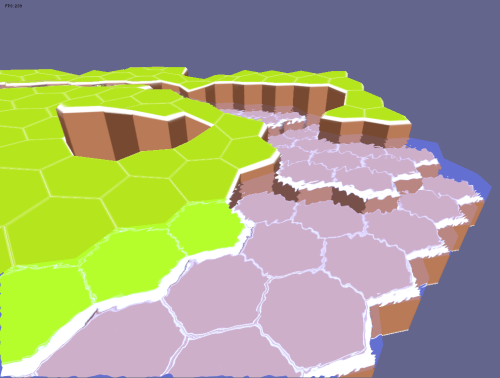
My initial idea was to use a render-to-texture and add a ripple effect on it to make it look like the water node is refracting whatever is behind it. The problem is that I can't align the texture properly.

I don't know if I'm being clear, some images to help:

ImageImage

as you can see, I have the refraction effect alredy working, but each hex should only show what is behind it instead of the entire texture.

This is my code:

onSetConstants:

Code: Select all

 
    f32 time = device->getTimer()->getTime() / 10000.f;
    services->setPixelShaderConstant("time",&time,1);
 
    matrix4 currentCameraPos = device->getSceneManager()->getActiveCamera()->getViewMatrix();
    f32 cameraPos[16] = {currentCameraPos[0],currentCameraPos[1],currentCameraPos[2],currentCameraPos[3],
                         currentCameraPos[4],currentCameraPos[5],currentCameraPos[6],currentCameraPos[7],
                         currentCameraPos[8],currentCameraPos[9],currentCameraPos[10],currentCameraPos[11],
                         currentCameraPos[12],currentCameraPos[13],currentCameraPos[14],currentCameraPos[15]};
    services->setVertexShaderConstant("cameraViewMatrix",cameraPos,1);
 
    matrix4 projection = device->getSceneManager()->getActiveCamera()->getProjectionMatrix();
    f32 cameraProj[16] = {projection[0],projection[1],projection[2],projection[3],
                         projection[4],projection[5],projection[6],projection[7],
                         projection[8],projection[9],projection[10],projection[11],
                         projection[12],projection[13],projection[14],projection[15]};
    services->setVertexShaderConstant("projectionMatrix",cameraProj,1);
 
    matrix4 abstransform = getAbsoluteTransformation();
    f32 nodetransform[16] = {abstransform[0],abstransform[1],abstransform[2],abstransform[3],
                         abstransform[4],abstransform[5],abstransform[6],abstransform[7],
                         abstransform[8],abstransform[9],abstransform[10],abstransform[11],
                         abstransform[12],abstransform[13],abstransform[14],abstransform[15]};
    services->setVertexShaderConstant("nodeTransform",nodetransform,1);
 
    int texture = 0;
    services->setPixelShaderConstant("myTexture", (float*)&texture, 1); //The RTT
 
    int texture1 = 1;
    services->setPixelShaderConstant("myBump", (float*)&texture1, 1);
 
Vertex Shader

Code: Select all

#version 120
 
uniform mat4x4 nodeTransform;
uniform mat4x4 cameraViewMatrix;
uniform mat4x4 projectionMatrix;
 
varying vec3 refractionMapTexCoord;
 
void main(void)
{
    mat4x4 worldViewProjection = nodeTransform * cameraViewMatrix * projectionMatrix;
    mat4x4 preViewProjection = cameraViewMatrix * projectionMatrix;
    mat4x4 preWorldViewProjection = worldViewProjection * preViewProjection;
 
    gl_TexCoord[0] = gl_MultiTexCoord0;
    gl_Position = ftransform();
}
Fragment Shader

Code: Select all

uniform sampler2D myBump;
uniform sampler2D myTexture;
uniform float time;
 
void main (void)
{
    gl_FragColor = texture2D(myBump,gl_TexCoord[0]+time/2);
    vec2 perturbation = (gl_FragColor.rg - 0.5)*2.0;
    vec2 perturbatedTexCoords = gl_TexCoord[0] + perturbation*0.2;
    gl_FragColor = texture2D(myTexture,perturbatedTexCoords);
}
There's also my gamedev question, where I explained it a bit differently: http://gamedev.stackexchange.com/questi ... -with-glsl

If you don't know the answer but knows how to make a search on this positioning problem, please tell me, I simply have no idea how to google this.

Thanks :)
REDDemon
Developer
Posts: 1044
Joined: Tue Aug 31, 2010 8:06 pm
Location: Genova (Italy)

Re: Texture coordinates in vertex shader

Post by REDDemon »

do just triplanar mapping but erase the code for side projection and keep just the code for the projection from "above".
Junior Irrlicht Developer.
Real value in social networks is not about "increasing" number of followers, but about getting in touch with Amazing people.
- by Me
hendu
Posts: 2600
Joined: Sat Dec 18, 2010 12:53 pm

Re: Texture coordinates in vertex shader

Post by hendu »

@REDDemon, that would be called "normal planar mapping", heh ;)
Mel
Competition winner
Posts: 2293
Joined: Wed May 07, 2008 11:40 am
Location: Granada, Spain

Re: Texture coordinates in vertex shader

Post by Mel »

Can't you use the matrix4::pointer() method to get the proper pointer of the matrix so you don't have to copy it all every time you use the constants?

Code: Select all

matrix4 abstransform = getAbsoluteTransformation();
    services->setVertexShaderConstant("nodeTransform",abstransform.pointer(),16);
I don't know.... That said...

I'm asuming you have rendered the whole scene to a rendertarget, and that, later, you are going to draw another mesh to simulate the water, and that way, you would do the refraction by sampling this texture. To render this mesh, you have to find the texture coordinates that would correspond to the position of the pixel currently being rendered, so you can read the texture properly, and make the refraction. In that case, i'd sample from (0.5*(gl_position.xy/gl_position.w) + 0.5) (if that makes any sense, Open GL isn't my strong point...) And later, modify those texture coordinates to read the texture, and that's it :).
"There is nothing truly useless, it always serves as a bad example". Arthur A. Schmitt
REDDemon
Developer
Posts: 1044
Joined: Tue Aug 31, 2010 8:06 pm
Location: Genova (Italy)

Re: Texture coordinates in vertex shader

Post by REDDemon »

hendu wrote:@REDDemon, that would be called "normal planar mapping", heh ;)
lol yeah! I can't remember name of everything XD but reading at mel's post maybe I missed what Luke was asking for :)
Junior Irrlicht Developer.
Real value in social networks is not about "increasing" number of followers, but about getting in touch with Amazing people.
- by Me
LukeBitts
Posts: 21
Joined: Fri Apr 22, 2011 6:02 am

Re: Texture coordinates in vertex shader

Post by LukeBitts »

do just triplanar mapping but erase the code for side projection and keep just the code for the projection from "above".
@REDDemon, that would be called "normal planar mapping", heh
Isn't planar mapping fixed? Or should I use the camera position to and create new texture coordinates every frame? (which is what I need I guess)
I'm asuming you have rendered the whole scene to a rendertarget, and that, later, you are going to draw another mesh to simulate the water, and that way, you would do the refraction by sampling this texture. To render this mesh, you have to find the texture coordinates that would correspond to the position of the pixel currently being rendered, so you can read the texture properly, and make the refraction. In that case, i'd sample from (0.5*(gl_position.xy/gl_position.w) + 0.5) (if that makes any sense, Open GL isn't my strong point...) And later, modify those texture coordinates to read the texture, and that's it .
Yes, you got it right, but what do you mean by "sample from (0.5*(gl_position.xy/gl_position.w) + 0.5)"?
Mel
Competition winner
Posts: 2293
Joined: Wed May 07, 2008 11:40 am
Location: Granada, Spain

Re: Texture coordinates in vertex shader

Post by Mel »

That you read the rendertarget in that location in the fragment shader to create the effect of the refraction.
"There is nothing truly useless, it always serves as a bad example". Arthur A. Schmitt
LukeBitts
Posts: 21
Joined: Fri Apr 22, 2011 6:02 am

Re: Texture coordinates in vertex shader

Post by LukeBitts »

That you read the rendertarget in that location in the fragment shader to create the effect of the refraction.
Oh my god, I can't believe it was so simple... and here was I trying to make way more complicated calculations... thanks a lot Mel :D

here's the final result:
Image

and the pixel shader:

Code: Select all

uniform sampler2D myBump;
uniform sampler2D myTexture;
uniform float time;
 
void main (void)
{
    vec4 bumpPixel = texture2D(myBump,gl_TexCoord[0]+time/2);
    vec2 perturbation = (bumpPixel.rg - 0.5)*2.0;
    vec2 pixelPos = (gl_FragCoord.xy / vec2(1024,768) );
    vec2 perturbationTexCoords = pixelPos.st + perturbation*0.03;
    gl_FragColor = texture2D(myTexture,perturbationTexCoords);
 
    gl_FragColor.b = gl_FragColor.b * 1.5;
    gl_FragColor.g = gl_FragColor.g * 1.1;
}
Mel
Competition winner
Posts: 2293
Joined: Wed May 07, 2008 11:40 am
Location: Granada, Spain

Re: Texture coordinates in vertex shader

Post by Mel »

I am glad of being of help :) Nice render!
"There is nothing truly useless, it always serves as a bad example". Arthur A. Schmitt
Post Reply