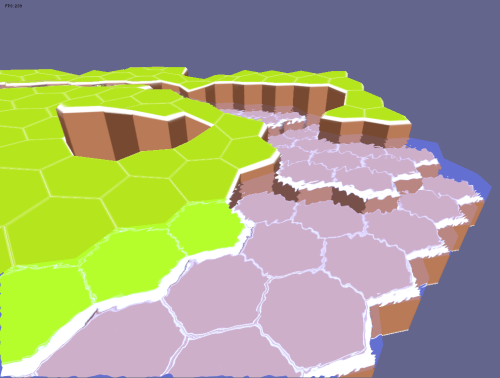
My initial idea was to use a render-to-texture and add a ripple effect on it to make it look like the water node is refracting whatever is behind it. The problem is that I can't align the texture properly.
I don't know if I'm being clear, some images to help:


as you can see, I have the refraction effect alredy working, but each hex should only show what is behind it instead of the entire texture.
This is my code:
onSetConstants:
Code: Select all
    f32 time = device->getTimer()->getTime() / 10000.f;
    services->setPixelShaderConstant("time",&time,1);

    matrix4 currentCameraPos = device->getSceneManager()->getActiveCamera()->getViewMatrix();
    f32 cameraPos[16] = {currentCameraPos[0],currentCameraPos[1],currentCameraPos[2],currentCameraPos[3],
                         currentCameraPos[4],currentCameraPos[5],currentCameraPos[6],currentCameraPos[7],
                         currentCameraPos[8],currentCameraPos[9],currentCameraPos[10],currentCameraPos[11],
                         currentCameraPos[12],currentCameraPos[13],currentCameraPos[14],currentCameraPos[15]};
    services->setVertexShaderConstant("cameraViewMatrix",cameraPos,1);

    matrix4 projection = device->getSceneManager()->getActiveCamera()->getProjectionMatrix();
    f32 cameraProj[16] = {projection[0],projection[1],projection[2],projection[3],
                         projection[4],projection[5],projection[6],projection[7],
                         projection[8],projection[9],projection[10],projection[11],
                         projection[12],projection[13],projection[14],projection[15]};
    services->setVertexShaderConstant("projectionMatrix",cameraProj,1);

    matrix4 abstransform = getAbsoluteTransformation();
    f32 nodetransform[16] = {abstransform[0],abstransform[1],abstransform[2],abstransform[3],
                         abstransform[4],abstransform[5],abstransform[6],abstransform[7],
                         abstransform[8],abstransform[9],abstransform[10],abstransform[11],
                         abstransform[12],abstransform[13],abstransform[14],abstransform[15]};
    services->setVertexShaderConstant("nodeTransform",nodetransform,1);

    int texture = 0;
    services->setPixelShaderConstant("myTexture", (float*)&texture, 1); //The RTT

    int texture1 = 1;
    services->setPixelShaderConstant("myBump", (float*)&texture1, 1);
Code: Select all
#version 120

uniform mat4x4 nodeTransform;
uniform mat4x4 cameraViewMatrix;
uniform mat4x4 projectionMatrix;

varying vec3 refractionMapTexCoord;

void main(void)
{
    mat4x4 worldViewProjection = nodeTransform * cameraViewMatrix * projectionMatrix;
    mat4x4 preViewProjection = cameraViewMatrix * projectionMatrix;
    mat4x4 preWorldViewProjection = worldViewProjection * preViewProjection;

    gl_TexCoord[0] = gl_MultiTexCoord0;
    gl_Position = ftransform();
}Code: Select all
uniform sampler2D myBump;
uniform sampler2D myTexture;
uniform float time;

void main (void)
{
    gl_FragColor = texture2D(myBump,gl_TexCoord[0]+time/2);
    vec2 perturbation = (gl_FragColor.rg - 0.5)*2.0;
    vec2 perturbatedTexCoords = gl_TexCoord[0] + perturbation*0.2;
    gl_FragColor = texture2D(myTexture,perturbatedTexCoords);
}If you don't know the answer but knows how to make a search on this positioning problem, please tell me, I simply have no idea how to google this.
Thanks